Anime Flashlight AI Photo Editing Prompt (2026)
Add a small anime version of yourself standing behind you with a bright flashlight, while your real photo, outfit and background stay the same. Copy the prompt, paste it in ChatGPT or Gemini with your photo, and you are done.
Quick answer
An anime flashlight AI photo editing prompt is a short text that asks an AI tool such as ChatGPT or Gemini to keep your uploaded photo and add a small anime version of you standing behind you, holding a flashlight that lights your back with a bright white beam. Copy the prompt below, upload one sharp photo with space behind you, and keep the lines that say to preserve your face and background.
Anime flashlight AI photo editing prompt: 2 results
One prompt, two results. Tap Copy prompt on any card, open ChatGPT or Gemini, upload your photo and paste.
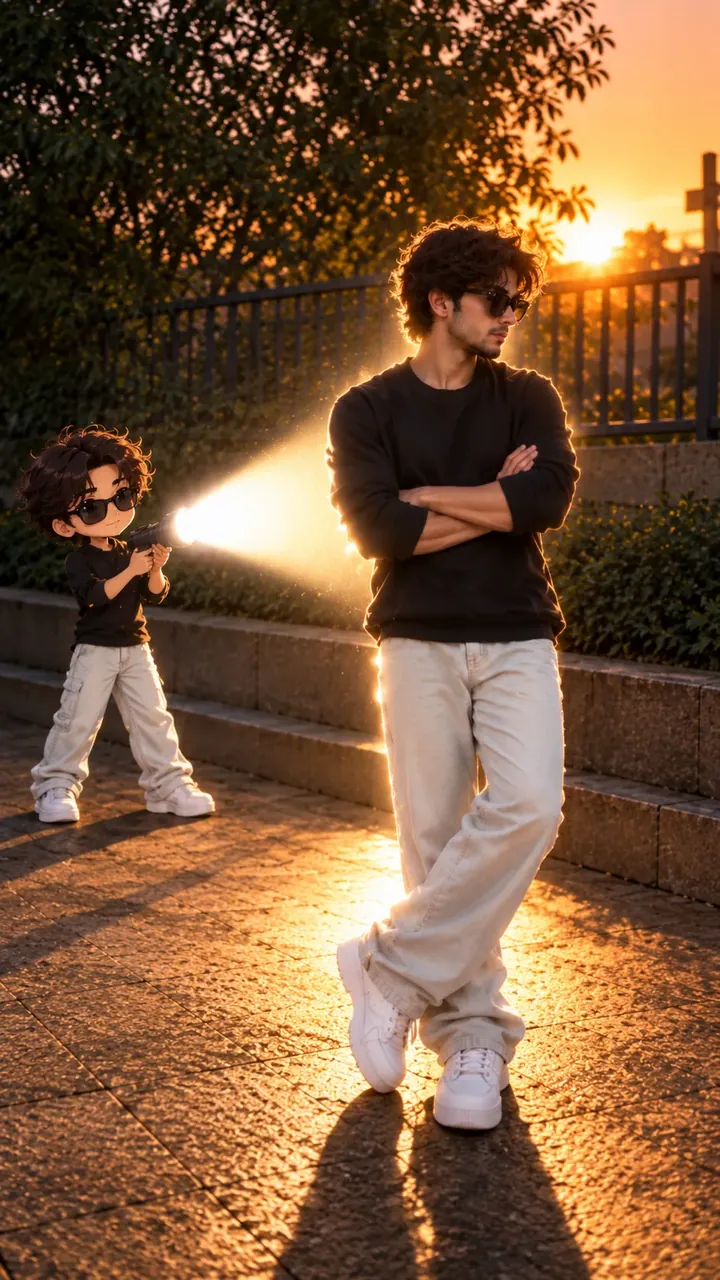
Anime flashlight photo transformation
Transform the uploaded photo into a cinematic real-life and anime fusion scene. Keep the main subject completely recognizable, preserving their original face, hairstyle, body proportions, clothing, accessories, pose, and overall appearance. Add a small full-body anime version of the same person standing naturally behind them, wearing the exact same outfit and matching the hairstyle and colors. Give the anime character a polished modern anime design with crisp linework, expressive eyes, subtle cel shading, and slightly exaggerated proportions. The anime character should hold a powerful flashlight directed toward the real subject’s back. Create an intense realistic white light beam with strong illumination, soft atmospheric glow, bright edge lighting, realistic shadows, and subtle light particles. Slightly darken the surrounding environment to emphasize the flashlight while maintaining the original sunset/outdoor atmosphere. Preserve the original background, camera perspective, framing, composition, and photographic realism. Make the anime character feel naturally integrated into the environment with accurate contact shadows and lighting interaction. Create a highly detailed, cinematic, realistic-looking final image with a seamless anime-meets-photography effect.
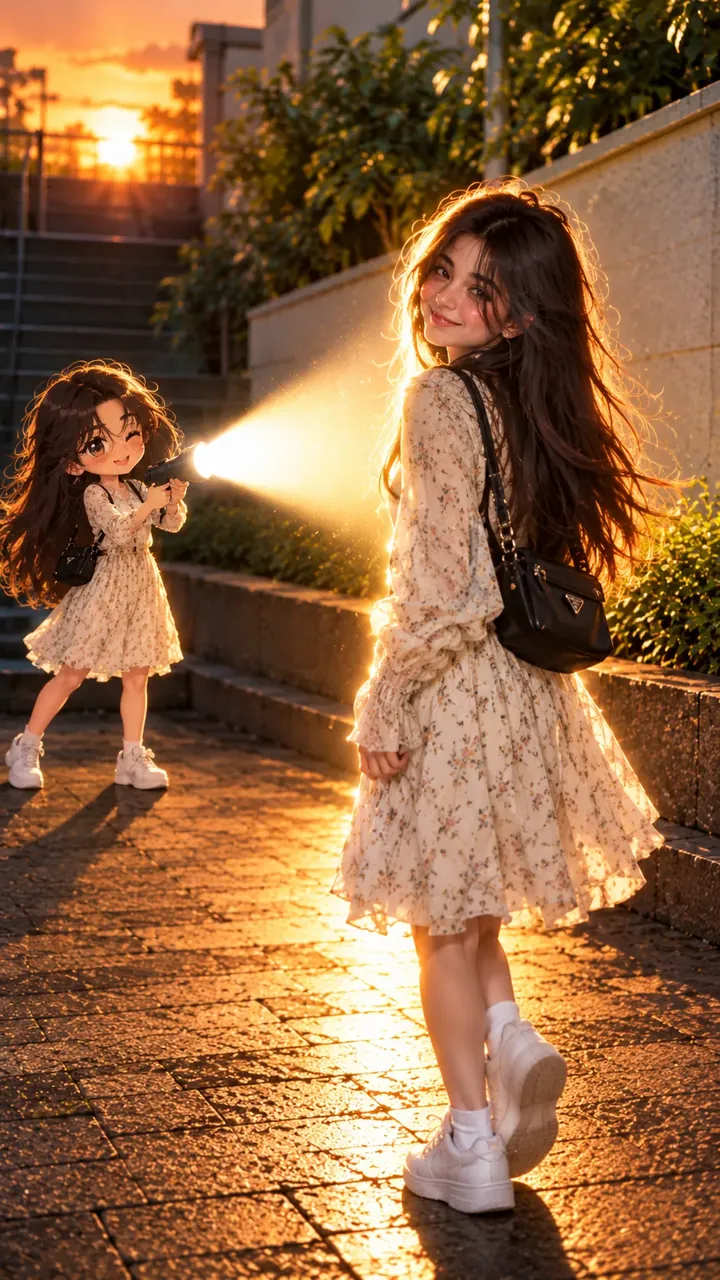
Girl anime flashlight AI edit
Transform the uploaded photo into a cinematic real-life and anime fusion scene. Keep the main subject completely recognizable, preserving their original face, hairstyle, body proportions, clothing, accessories, pose, and overall appearance. Add a small full-body anime version of the same person standing naturally behind them, wearing the exact same outfit and matching the hairstyle and colors. Give the anime character a polished modern anime design with crisp linework, expressive eyes, subtle cel shading, and slightly exaggerated proportions. The anime character should hold a powerful flashlight directed toward the real subject’s back. Create an intense realistic white light beam with strong illumination, soft atmospheric glow, bright edge lighting, realistic shadows, and subtle light particles. Slightly darken the surrounding environment to emphasize the flashlight while maintaining the original sunset/outdoor atmosphere. Preserve the original background, camera perspective, framing, composition, and photographic realism. Make the anime character feel naturally integrated into the environment with accurate contact shadows and lighting interaction. Create a highly detailed, cinematic, realistic-looking final image with a seamless anime-meets-photography effect.
What is an anime flashlight AI photo editing prompt?
It is a written instruction that tells an AI image tool to blend a real photo with an anime character that looks like you. The anime twin stands behind you and shines a flashlight, so the beam, the edge glow and the shadows tie the two worlds together.
The effect works because the real part stays realistic while only the twin is drawn in anime style. That contrast, plus dramatic back lighting, is why it suits sunset photos, travel pictures and Reel covers. For more free picks, see the Editing Prompt homepage.
What each part of the prompt does
- Transform the uploaded photo. Starts from your real picture, so the scene stays photographic and only the extras are added.
- Keep the subject recognizable. Locks your face, hair, body shape, clothes and pose so the result still looks like you.
- Small full-body anime twin. Adds the cartoon version of you standing behind, in the same outfit and colors.
- Anime design words. Crisp linework, expressive eyes and light cel shading give the twin a clean modern anime look.
- Flashlight and beam. A white beam aimed at your back creates the glow, edge light and floating light particles.
- Darker surroundings. Dimming the scene a little makes the beam stand out without losing the sunset mood.
- Preserve the original scene. Keeps your background, camera angle and framing unchanged.
- Contact shadows. Shadows under the anime character make it feel like it is standing in the real place.
Where to use the result
- Instagram feed or Reel cover: the glowing back light makes a plain photo stop the scroll.
- Sunset and travel photos: the outdoor light already matches the beam, so the blend looks natural.
- Profile picture: crop to the upper body so the face and the beam stay clear.
Pick a photo that gives the twin room
Use a sharp photo where your whole outfit is visible and there is empty space behind you. A crowded or cropped photo leaves no place for the anime character to stand.
How to use this prompt in ChatGPT and Gemini
Open your AI tool
Use the ChatGPT or Gemini app or website, sign in and pick the image creation option.
Upload your photo
Add one sharp photo, ideally outdoors at sunset, with your whole outfit visible and space behind you.
Paste the prompt
Paste the full prompt and send. If the anime character does not match your outfit, repeat the matching line.
Adjust and save
If it is close, ask for one change, such as a brighter beam or a smaller anime character. Then download the version you like.
Easy ways to change the look
Change one phrase at a time and compare. These swaps are starting points, and results vary by tool.
- Beam color: replace white with warm gold, soft blue or pink for a different mood.
- Anime size: ask for a smaller or a taller anime character.
- Light source: swap the flashlight for a lantern, a phone light or a glowing staff.
- Time of day: change the sunset to blue hour or night, and say the beam is the main light.
- Anime style: ask for a softer pastel anime look instead of strong cel shading.
Fix common problems with anime flashlight prompts
Most problems come from the anime twin not blending with the real photo. Here is what to try first.
- The anime character looks pasted on. Repeat: accurate contact shadows, matching light direction and the same color grade as the photo.
- The outfit does not match. Repeat: wearing the exact same outfit, hairstyle and colors as the real person.
- My face changed. Repeat: keep the original face exactly the same, and use a sharper photo.
- The beam is too weak. Add: intense white beam, strong rim light on hair and shoulders, darker surroundings.
- The beam washes out the photo. Add: controlled glow, no overexposure, keep skin tones natural.
- The background changed. Repeat: preserve the original background, camera angle and framing exactly.
AI results differ every run, so it is worth running the same prompt twice before you change it.
Anime flashlight prompt questions
What is an anime flashlight AI photo editing prompt?
It is a short written instruction that asks an AI image tool to keep your real photo and add a small anime version of you standing behind you with a flashlight. The beam lights your back with a white glow while your face, outfit and background stay the same.
Do I need to upload a photo?
Yes. The prompt starts with transform the uploaded photo, so you must attach one. Pick a sharp photo with some space behind you, because the anime character needs room to stand there.
Why does the anime character not match my outfit?
The tool may have missed the matching line. Repeat: the anime version wears the exact same outfit, hairstyle and colors as the real person, and check that your outfit is fully visible in the photo.
How do I make the light beam stronger?
Add intense white beam, brighter rim light on the shoulders and hair, and darker surroundings. Change only the lighting words so the rest of the scene stays the same.
Will the AI change my face or the background?
It can when the result drifts. The prompt already asks to keep your face and the original background, so repeat those two lines at the end and use a clear, well-lit photo.
Can I use it for a couple or a group photo?
The prompt is written for one main subject. For two people, ask for one small anime version of each person, and expect to test a few times because results vary.
Which AI tool works best, ChatGPT or Gemini?
Both can follow the same text. Results differ between them, so if one gives a weak beam or a pasted-looking anime character, run the same prompt in the other and compare.
Is it free, and is it safe to upload my photo?
The prompt is free to copy, with no sign-up. ChatGPT and Gemini both offer some free image access, but limits can change, so check the app. Only upload photos you are comfortable sharing, and check the tool’s privacy settings first.
Recent posts
Girl Chibi AI Photo Editing Prompt
Polaroid Couple Photo Editing Prompt
Crayon Shin-Chan AI Photo Editing Prompt
Want more? Browse every free prompt on Editing Prompt.