Polaroid Couple Photo Editing Prompt (2026)
Turn a couple photo into a casual, flash-lit Polaroid snapshot in front of a white curtain, with both faces kept the same. Copy a prompt, paste it in ChatGPT or Gemini with your photo, and you are done.
Quick answer
A Polaroid couple photo editing prompt is a short text that asks an AI tool such as ChatGPT or Gemini to restyle a photo of two people as an instant-camera snapshot, with a slight blur, an even flash-like light and a plain white curtain behind them. Copy a prompt below, upload one sharp photo of the couple, and keep the line that says not to change the faces.
Polaroid couple photo editing prompt: 3 looks
Three looks, three prompts. Tap Copy prompt, open ChatGPT or Gemini, upload your photo and paste.

Hugging couple Polaroid snapshot
Take a photo with a Polaroid camera. The photo should look like a normal snapshot, without any clear main subject or props. It should have a slight blur and a consistent light source, like a flash in a dark room, spread evenly across the frame. Do not change the faces. Replace the background behind the two people with a white curtain. Show the two of them hugging, in matching couple outfits.

Candid cute pose Polaroid
Take a photo with a Polaroid camera. The photo should look like an ordinary snapshot, without any clear main subject or props. It should have a slight blur and a consistent light source, like a flash in a dark room, spread evenly across the frame. Do not change the faces. Replace the background behind the two people with a white curtain. Show the two of them in a cute, candid pose together.
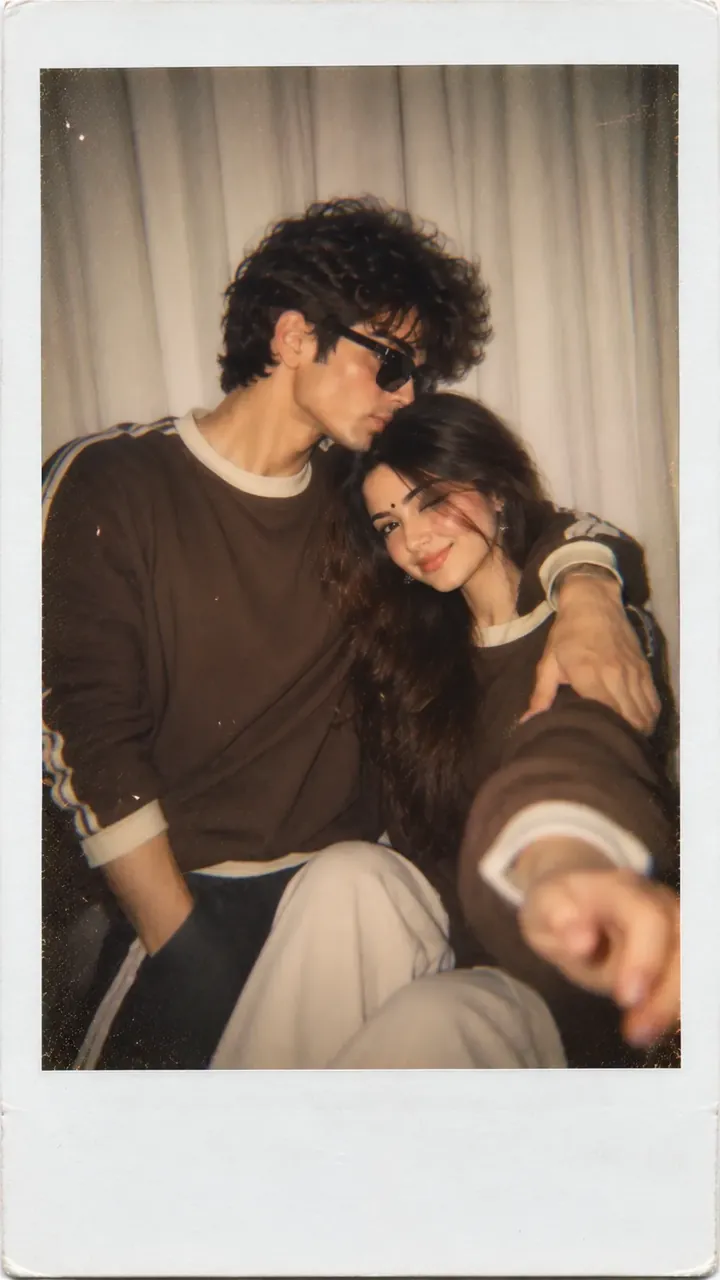
Vintage Polaroid couple portrait
A photo taken with a Polaroid camera. The photo should look like an ordinary snapshot, without any clear main subject or props. It should have a slight blur and a consistent light source, like a flash in a dark room, spread evenly across the frame. Do not change the faces. Replace the background behind the two people with a white curtain. Show the two of them in a cute, candid pose together. Make sure the faces stay exactly the same.
What is a Polaroid couple photo editing prompt?
It is a written instruction that tells an AI image tool how to make a couple photo look like an instant-camera snapshot. Instead of asking for a perfect portrait, the prompt asks for an imperfect, casual picture, which is exactly what makes a Polaroid feel real.
Most AI photos look too clean. These prompts work in the opposite direction: they ask for slight blur, flash in a dark room and no clear main subject, so the result feels like a quick moment between two people rather than a studio shot. For more free picks, see the Editing Prompt homepage.
What each part of these prompts does
- Take a photo with a Polaroid camera. Sets the whole look in one line, before any detail is added.
- Ordinary snapshot, no clear main subject or props. Removes the staged feel, so nothing in the frame competes with the couple.
- Slight blur. Adds the soft, imperfect focus of an instant camera.
- Consistent flash-like light. Light spread evenly across the frame gives the direct flash look of a dark room.
- Do not change the faces. Keeps both people recognisable, and the third prompt repeats it as a stronger lock.
- White curtain background. Replaces a messy background with one plain, bright surface.
- The pose line. Hugging in matching outfits, or a cute candid pose, decides the mood.
Which prompt should you pick?
- Anniversary or couple post: the hugging Polaroid with matching outfits.
- Everyday, relaxed picture: the candid cute pose.
- When a face keeps changing: the third prompt, which repeats the face-lock line.
If a face changes, add this line
Make sure the faces stay exactly the same. Paste it at the end of any prompt if the first result looks like someone else.
How to use these prompts in ChatGPT and Gemini
Open your AI tool
Use the ChatGPT or Gemini app or website, sign in and pick the image creation option.
Upload your photo
Add one sharp photo where both faces are clearly visible, with good light.
Paste the prompt
Paste the full prompt and send. If a face changes, add: make sure the faces stay exactly the same.
Adjust and save
If it is close, ask for one change, such as a stronger flash or a different outfit. Then download the version you like.
Easy ways to change the look
Change one phrase at a time and compare. These swaps are starting points, and results vary by tool.
- Curtain: replace white curtain with a pastel pink, cream or sheer lace curtain.
- Outfits: name the matching outfits, such as white shirts and blue jeans, instead of leaving it open.
- Flash strength: use stronger flash for harder shadows, or soft flash for a gentler glow.
- Frame: add a white Polaroid frame border with a thicker bottom edge.
- Mood: change the pose to forehead touch, back hug or laughing together.
Fix common problems with Polaroid prompts
Most problems come from the result looking too polished or from a face drifting. Here is what to try first.
- The picture looks too clean. Add: amateur snapshot, slight motion blur, visible film grain.
- A face looks different. Use one sharp, front-facing photo and add: make sure the faces stay exactly the same.
- The curtain is not white. Repeat: plain white curtain, no other background objects.
- Props or text appeared. Repeat: no props, no text, no watermark.
- The couple are not touching. Describe the pose clearly, such as arms around each other, cheeks close together.
- The flash looks uneven. Repeat: even flash lighting across the whole frame.
AI results differ every run, so it is worth running the same prompt twice before you change it.
Polaroid couple prompt questions
What is a Polaroid couple photo editing prompt?
It is a short written instruction that asks an AI image tool to turn a photo of two people into a snapshot that looks like it was taken with a Polaroid camera, with a flash-lit, slightly blurry, casual feel. The prompts on this page also swap the background for a white curtain and keep both faces unchanged.
What makes the result look like a real Polaroid?
Three phrases do most of the work: a slight blur, a consistent flash-like light source spread evenly across the frame, and no clear main subject or props. Together they remove the polished look and give the casual, imperfect feel of an instant camera.
Do I need a photo of both people?
Yes. Upload one sharp photo that shows both people clearly, or one photo of each person if your tool accepts several images. The prompt says not to change the faces, so the tool needs clear faces to copy.
How do I keep both faces the same?
Use a sharp, front-facing photo and keep the line do not change the faces in the prompt. The third prompt adds make sure the faces stay exactly the same, which you can paste at the end of any of the three.
Can I choose the outfits?
Yes. The hugging prompt asks for matching couple outfits, and you can name them, such as white shirts and blue jeans for both. Naming the outfit gives a more exact result than leaving it to the tool.
Which AI tool works best for these prompts, ChatGPT or Gemini?
Both can follow the same text. Results differ between them, so if one makes the picture too sharp or changes a face, run the same prompt in the other and compare.
How do I add the white Polaroid frame border?
The prompts do not include the white border around the picture. Add the line: with a white Polaroid frame border and a thicker bottom edge, at the end of the prompt, or add the frame later in a photo app.
Is it free, and is it okay to edit a partner’s photo?
The prompts are free to copy, with no sign-up. ChatGPT and Gemini both offer some free image access, but limits can change, so check the app. Only edit photos of people who agree to it, and check the tool’s privacy settings before uploading.
Recent posts
Crayon Shin-Chan AI Photo Editing Prompt
Attitude Boy Photo Editing Prompt

Romantic Couple Photo Editing Prompt
Want more? Browse every free prompt on Editing Prompt.