Attitude Boy Photo Editing Prompt (2026)
Turn one photo into a 90s flash street portrait, a rainy cinematic shot or a golden hour beach collage. Copy a prompt, paste it in ChatGPT or Gemini with your photo, and you are done.
Quick answer
An attitude boy photo editing prompt is a short text that asks an AI tool such as ChatGPT or Gemini to restyle one uploaded photo of a boy with a confident, moody look, like a 90s flash portrait, a rainy sunglasses shot or a sunset beach collage. Copy a prompt below, upload one sharp photo, and keep the line that says the face stays the same.
Attitude boy photo editing prompt: 3 looks
Three looks, three prompts. Tap Copy prompt, open ChatGPT or Gemini, upload your photo and paste.

90s flash street portrait
Ultra-realistic 1990s-style candid flash portrait of the same young man, same face, hairstyle and skin tone, wearing an oversized hoodie under a sharply tailored blazer. Bright direct on-camera flash, slightly overexposed highlights, realistic skin texture, soft shadows behind him. Dark atmospheric background with a faint magenta glow and blurred vintage Polaroids on the wall. Medium-wide framing from mid-thigh up, natural candid pose, relaxed shoulders, unposed body language. Authentic 90s film-photography style, subtle grain, halation on highlights, muted blacks, nostalgic editorial mood. Avoid: modern smartphone look, plastic skin, CGI appearance, extreme close-up, distorted hands, extra fingers, cartoon or anime style, text, watermark.

Rainy cinematic sunglasses portrait
Ultra-realistic cinematic medium close-up portrait of a young man, framed from the waist up with his face, shoulders and surroundings clearly visible. Keep his face, hairstyle and skin tone exactly the same as the uploaded reference photo. Naturally messy, damp hair, wet skin with visible water droplets on his face, neck and clothing. He wears black rectangular sunglasses with droplets on the lenses, one hand lightly touching the frame. Dramatic low-key lighting, deep shadows, soft highlights on the wet skin and lenses, realistic skin texture, dark minimal background, shallow depth of field. Fashion-editorial mood, natural proportions, photorealistic detail, 85mm lens, f/2.0, soft bokeh, sharp focus, 8K quality. Avoid: extreme close-up, distorted hands, extra fingers, plastic-looking skin, cartoon style, blurry face.
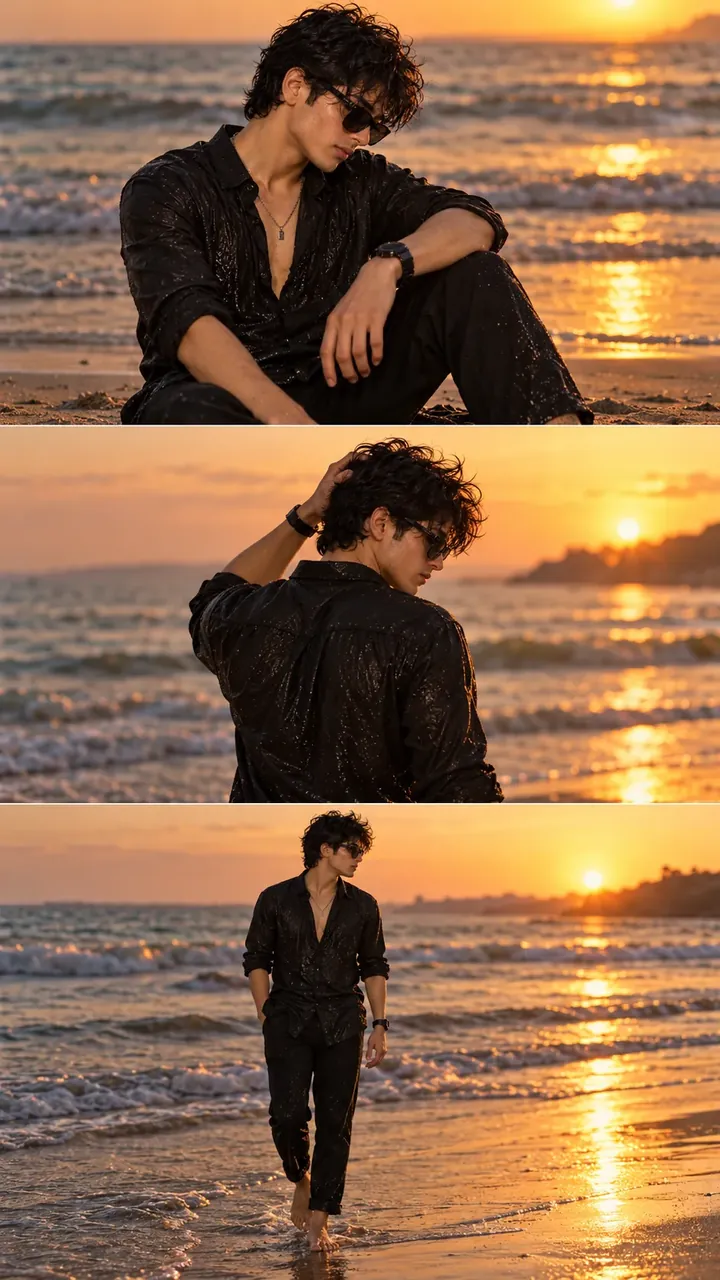
Golden hour beach three-panel collage
Ultra-realistic cinematic three-panel vertical collage of the same stylish young man at a beach during a golden-hour sunset. Keep his exact face, hairstyle, skin tone, outfit and body proportions identical across all three panels. Top panel: sitting on the sand, one knee raised, looking down thoughtfully, gentle waves behind him. Middle panel: rear three-quarter shot near the shoreline, one hand through his hair, warm rim light on his shoulders. Bottom panel: full-body shot walking along the shoreline, gazing at the horizon, golden light reflecting on the water. Photorealistic fashion-editorial style, natural lighting, realistic skin and hair texture, soft film grain, shallow depth of field, cinematic color grading, 8K detail. Keep lighting, weather and identity consistent across all three panels. Avoid: text, borders, distorted hands, extra fingers, artificial-looking skin, cartoon style.
What is an attitude boy photo editing prompt?
It is a written instruction that tells an AI image tool how to give a boy’s photo a confident, cinematic attitude look. You describe the clothes, the light, the framing and the mood, and the tool rebuilds the picture around his face.
The attitude look is mostly about light and body language: hard flash, deep shadows, wet skin, sunglasses or an unposed stance. That is why these prompts spend more words on lighting and camera settings than on clothes. For more free picks, see the Editing Prompt homepage.
What each part of these prompts does
- Photo style first. Phrases like 1990s candid flash or cinematic medium close-up set the whole look before any detail is added.
- Face and identity lines. Same face, hairstyle and skin tone keep the result recognisable.
- Light words. Direct on-camera flash, low-key lighting or golden hour rim light decide the mood in a few words.
- Framing and lens. Mid-thigh-up framing, an 85mm lens and f/2.0 control how close and how blurry the background looks.
- Texture words. Realistic skin texture, film grain and halation make it look photographed, not painted.
- The Avoid line. Listing plastic skin, distorted hands or cartoon style nudges the tool away from common mistakes.
Which prompt should you pick?
- Profile picture or street style post: the 90s flash street portrait.
- Dark, moody close-up: the rainy cinematic sunglasses portrait.
- Story or reel cover with several poses: the golden hour beach three-panel collage.
If the face drifts, add this line
Keep his face, hairstyle and skin tone exactly the same as the uploaded reference photo. Repeat it at the end of the prompt if the first result looks like someone else.
How to use these prompts in ChatGPT and Gemini
Open your AI tool
Use the ChatGPT or Gemini app or website, sign in and pick the image creation option.
Upload your photo
Add one sharp, front-facing photo with good light. These prompts keep the face from this photo.
Paste the prompt
Paste the full prompt, Avoid line included, and send. If the face drifts, repeat the face-lock line from this page.
Adjust and save
If it is close, ask for one change, such as softer flash or warmer light. Then download the version you like.
Easy ways to change the look
Change one phrase at a time and compare. These swaps are starting points, and results vary by tool.
- Outfit: swap the hoodie and blazer for a leather jacket, or the black sunglasses for clear frames.
- Flash strength: use softer on-camera flash for a gentler 90s look, or harder flash for more contrast.
- Setting: move the beach collage to a rooftop, a desert road or a city street at dusk.
- Colour mood: change the magenta glow to blue or amber, or ask for black-and-white film.
- Format: add vertical 4:5 for a feed post, or vertical 9:16 for a Story.
Fix common problems with attitude boy prompts
Most problems come from a weak photo or from missing detail about the face and hands. Here is what to try first.
- The face does not look like him. Use one sharp, front-facing photo and repeat the face-lock line.
- The skin looks plastic. Add: natural skin texture, visible pores, no smoothing.
- The hands look wrong. Add: hands relaxed and fully visible with five fingers, then run it again.
- The flash looks too modern. Add: 35mm film camera, slight grain, no smartphone look.
- The collage panels do not match. Add: same face, outfit and lighting in every panel.
- The shape is wrong. Keep the ratio at the start of the prompt and pick the matching size in the tool if it offers one.
AI results differ every run, so it is worth running the same prompt twice before you change it.
Attitude boy prompt questions
What is an attitude boy photo editing prompt?
It is a short written instruction that asks an AI image tool to restyle a boy’s photo with a confident, moody look, such as a 90s flash portrait, a rainy cinematic shot or a golden hour beach collage. Each prompt on this page names the outfit, the light, the framing and the mood.
Do I need to upload my own photo?
Yes. These prompts ask for the same face as the uploaded photo, so upload one sharp, front-facing photo first. Without a photo, the tool will invent a face.
What do the Avoid lines at the end of the prompts do?
They list things you do not want, such as distorted hands, plastic skin or cartoon style. They help the tool steer away from common errors, though they are a nudge and not a guarantee, so check the hands and face in the result.
Which AI tool works best for these prompts, ChatGPT or Gemini?
Both can follow the same text. Results differ between them, so if one gives plastic-looking skin or a face that drifts, run the same prompt in the other and compare.
How do I keep the face the same in the beach collage?
The prompt already asks for the exact face, hairstyle, skin tone and outfit across all three panels. Upload one sharp, front-facing photo, and if one panel drifts, add: same face in every panel, no changes.
Why do the hands look odd in my result?
Hands are one of the hardest parts for AI images. Run the prompt again, ask for the hands to be relaxed and fully visible, or choose a framing where the hands are partly out of the shot.
What size should I use for these portraits?
The beach collage is a vertical three-panel layout, and the other two prompts work well as vertical 4:5 or 9:16 images for Instagram and Stories. Add the ratio you want at the start of the prompt.
Is it free, and is it safe to upload my photo?
The prompts are free to copy, with no sign-up. ChatGPT and Gemini both offer some free image access, but limits can change, so check the app. Only upload photos you are comfortable sharing, and check the tool’s privacy settings first.
Recent posts

Romantic Couple Photo Editing Prompt
Aesthetic Girl AI Photo Editing Prompt for Gemini
Aesthetic Blurry Saree AI Photo Editing Prompt
Want more? Browse every free prompt on Editing Prompt.