Flash Photo Effect AI Photo Prompt: 3 Looks | Editing Prompt
Flash Photo Effect AI Photo Prompt: 3 Looks (2026)
Get the viral direct-flash Instagram aesthetic without a camera. Copy a prompt below, paste it in ChatGPT or Gemini with your photo, and get bright faces, harsh highlights, and that candid nightlife look.
Quick answer
A flash photo effect AI photo prompt is a short copy-paste text that recreates direct on-camera flash photography: bright face, harsh highlights, deep shadows, and a slightly grainy nightlife look. Pick a prompt below, upload one photo, and paste the full text to get the viral aesthetic in seconds.
Flash photo effect AI photo prompt: 3 looks
Three viral looks, three prompts. Tap Copy prompt, open ChatGPT or Gemini, upload your photo and paste.
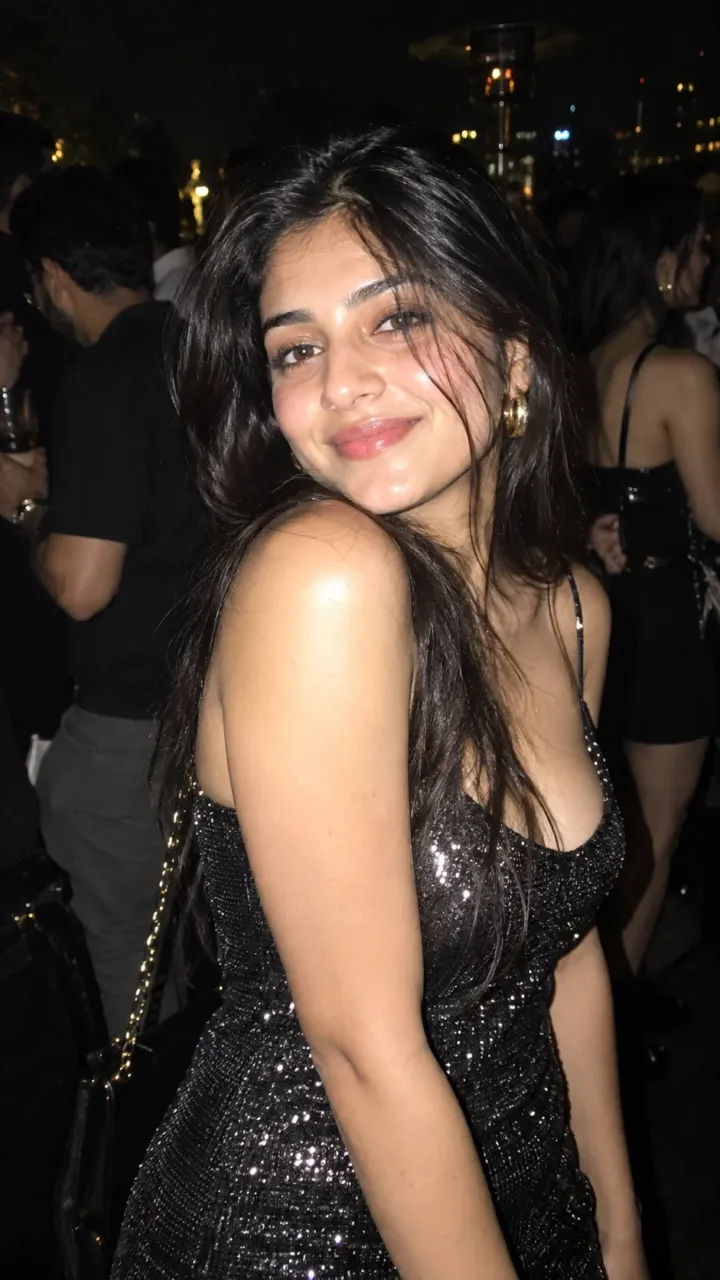
Night party flash portrait prompt
Turn this photo into a direct-flash night party shot: keep my face exactly the same, harsh bright on-camera flash, slightly overexposed highlights, crisp skin texture, dark ambient background, high contrast, realistic grain, candid Instagram nightlife aesthetic. 35mm flash photography feel, sharp details. Keep the face exactly unchanged, Indian woman, natural skin tones. Authentic unedited look, no text, no watermark.
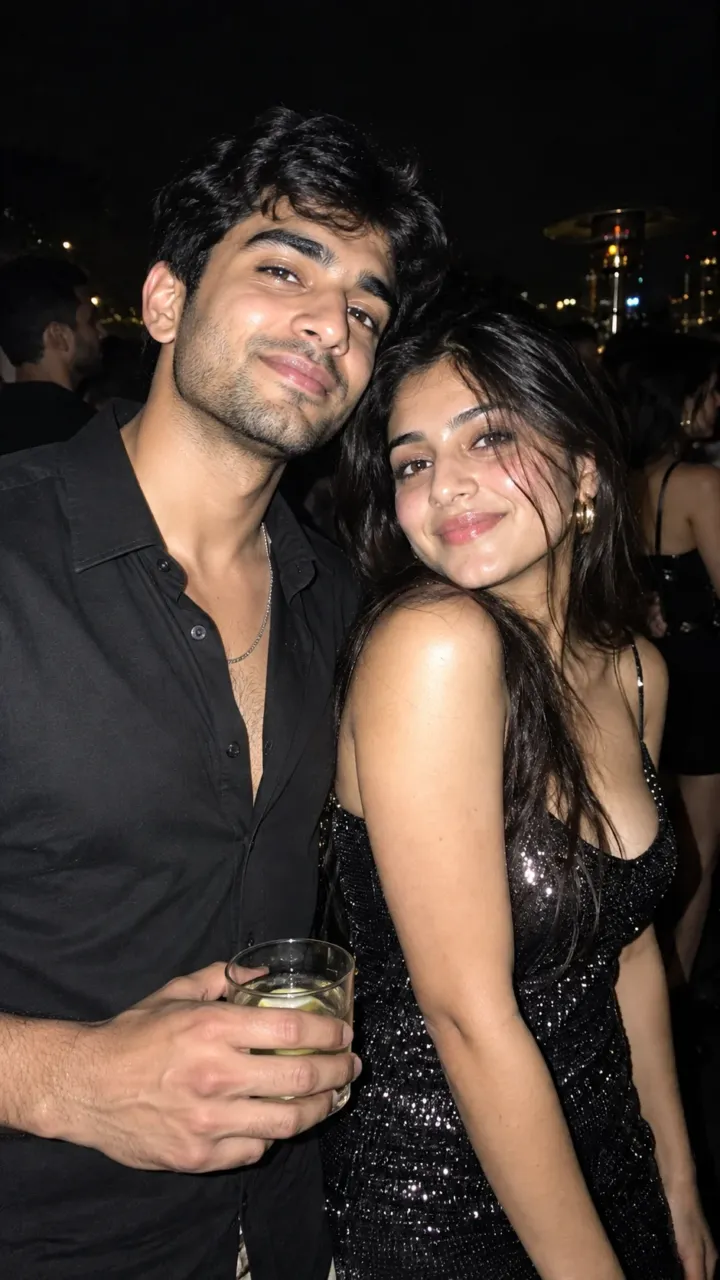
Street night flash couple prompt
Restyle this photo into a flash-lit street night shot: keep both faces exactly the same, direct camera flash on the couple, city street blurred dark behind, harsh highlights on faces, deep shadows, subtle grain, candid late-night Instagram aesthetic. High contrast, glossy eyes, realistic party photography. Keep both faces exactly unchanged, Indian couple. Raw candid vibe, no text, no watermark.
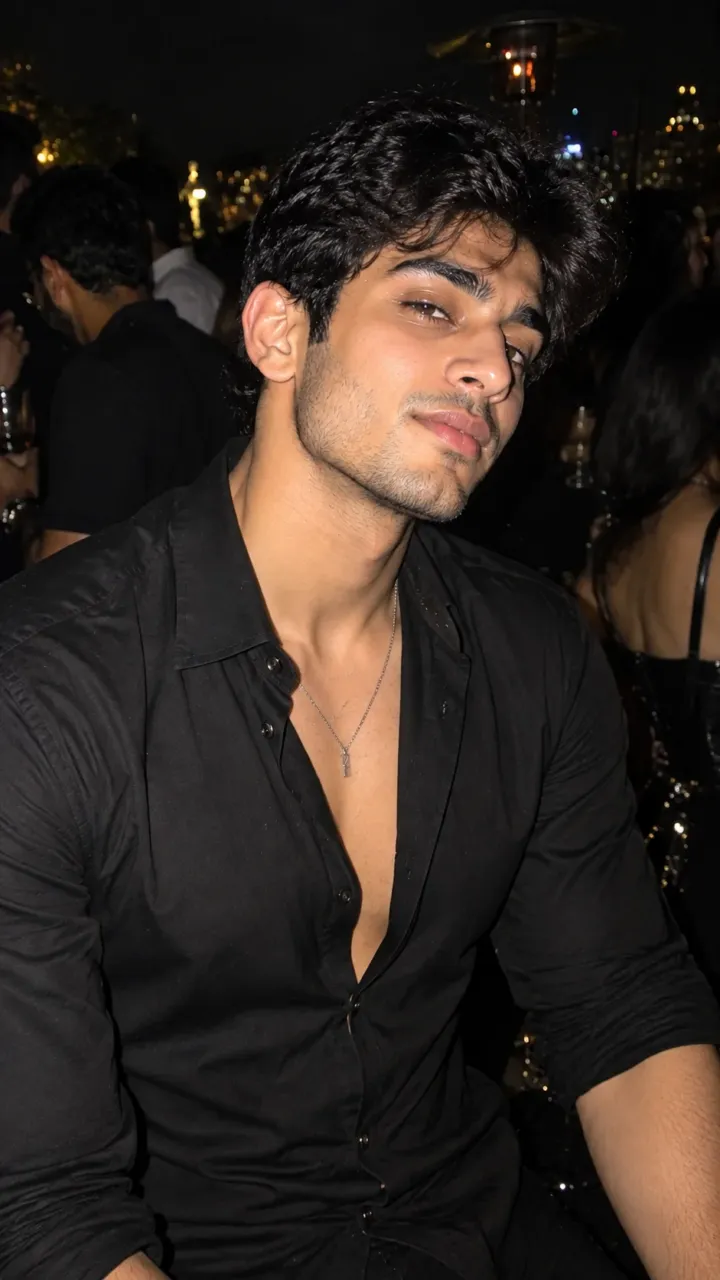
Indoor flash mirror selfie prompt
Transform this photo into a flash mirror selfie: keep the person exactly the same, phone flash firing in a dim room, bright face with harsh flash falloff, dark corners, slight motion feel, grainy authentic texture, candid Instagram aesthetic. Sharp on the face, background moody and dark. Keep the face exactly unchanged, Indian man. Effortless viral look, no text, no watermark.
What is the flash photo effect trend?
It recreates the direct-flash look of candid night party photos with AI. The trend is all about bright faces, harsh highlights, deep shadows, and a slightly grainy low-light feel, like photos taken with a camera flash at a party. One prompt recreates the whole lighting style while keeping your face intact.
What each part of these prompts does
- The flash setup. Harsh bright flash with overexposed highlights and dark ambient background.
- Keep the face unchanged. Locks your face so the edit stays authentic.
- The grain. Realistic grain and high contrast sell the 35mm flash feel.
- The mood words. Candid, nightlife, and authentic push the imperfect party look.
- No text, no watermark. Keeps the edit clean and ready to post.
- Indian faces. Keeps features and skin tones natural under flash.
Which prompt should you pick?
- Classic viral post: the night party flash portrait.
- Couple post: the street night flash couple shot.
- Casual post: the indoor flash mirror selfie.
If a face changes, add this line
Make sure the face stays exactly the same. Paste it at the end of any prompt if the first result looks like someone else.
How to use these prompts in ChatGPT and Gemini
Open your AI tool
Use the ChatGPT or Gemini app or website, sign in and pick the image creation option.
Upload your photo
Add one sharp photo where your face is clearly visible, with decent light.
Paste the prompt
Paste the full prompt and send. If the face changes, add: make sure the face stays exactly the same.
Adjust and save
If it is close, ask for one small change, such as lighting or background. Then download the version you like.
Easy ways to change the look
Change one phrase at a time and compare. These swaps are starting points, and results vary by tool.
- Setting: swap the party for a club, a rooftop, or a car interior.
- Intensity: ask for a softer flash for a polished influencer look.
- Colour: add a slight warm or cool tone to the flash.
- Crop: try a close crop on the face for extra candid energy.
- Props: add sunglasses on head or a drink in hand for party vibes.
Fix common problems with flash photo prompts
Most problems come from a face drifting or the effect looking off. Here is what to try first.
- A face looks different. Use one sharp photo and add: make sure the face stays exactly the same.
- Flash looks too soft. Add: harsh direct flash, strong highlights, deep shadows.
- Background too bright. Add: dark ambient background, low light behind subject.
- No grain. Add: realistic film grain, 35mm texture.
- Text or watermark appeared. Repeat: no text, no watermark, no logos.
- Skin looks washed out. Add: natural skin tones, crisp skin texture.
AI results differ every run, so it is worth running the same prompt twice before you change it.
Flash photo prompt questions
What is a flash photo effect AI photo prompt?
It is a short copy-paste text that recreates direct on-camera flash photography: bright face, harsh highlights, deep shadows, and grainy nightlife tones.
Do these prompts work in both ChatGPT and Gemini?
Yes. The wording is plain and tool-neutral. If one tool softens the flash, run the same prompt in the other and compare.
How do I keep my face the same?
Upload one sharp photo where your face is clearly visible, and keep the line keep the face exactly unchanged in the prompt.
Can I use these for a couple photo?
Yes. The street night prompt is made for couples. Upload one clear couple photo and both faces stay unchanged.
Is it free to use these prompts?
The prompts are free to copy, with no sign-up. ChatGPT and Gemini both offer some free image access, but limits can change, so check the app.
Why is the flash look trending?
It feels candid and real compared to polished edits, so it stands out in feeds full of perfect photos.
Recent posts
1970s Family Album AI Photo Prompt

Retro Couple AI Photo Prompt
Diwali Celebration Couple AI Photo Prompt
Want more? Browse every free prompt on Editing Prompt.