Retro Couple AI Photo Prompt (2026)
Give your couple photo a vintage film makeover: grainy 70s warmth, a 90s flash snapshot, or an old movie poster look, all while both faces stay exactly the same. Copy a prompt, paste it in ChatGPT or Gemini with your photo, and get a retro edit in seconds.
Quick answer
A retro couple AI photo prompt is a short instruction that asks an AI tool such as ChatGPT or Gemini to restyle a photo of two people with a vintage look, like 1970s film warmth, a 1990s flash snapshot, or an old painted movie poster. Upload one clear couple photo, paste one of the prompts below, and keep the line that says not to change the faces.
Retro couple AI photo prompt: 3 looks
Three vintage looks, three prompts. Tap Copy prompt, open ChatGPT or Gemini, upload your photo and paste.

Retro vinyl 70s couple portrait
Turn this couple photo into a retro 1970s film portrait with warm grainy tones, soft faded colours and a gentle glow around the edges. Dress the couple in 70s style: the man in a checked shirt with a classic haircut, the woman in a floral print dress with soft waves. Keep both faces exactly the same, do not change their identity.

Retro 90s flash film couple photo
Restyle this couple photo to look like a 1990s flash photograph: harsh direct flash, slightly brightened skin, deep shadows behind them and visible film grain. Give it the feel of an old point-and-shoot camera, with casual denim outfits on both. Do not change the faces, keep them identical to the original photo.
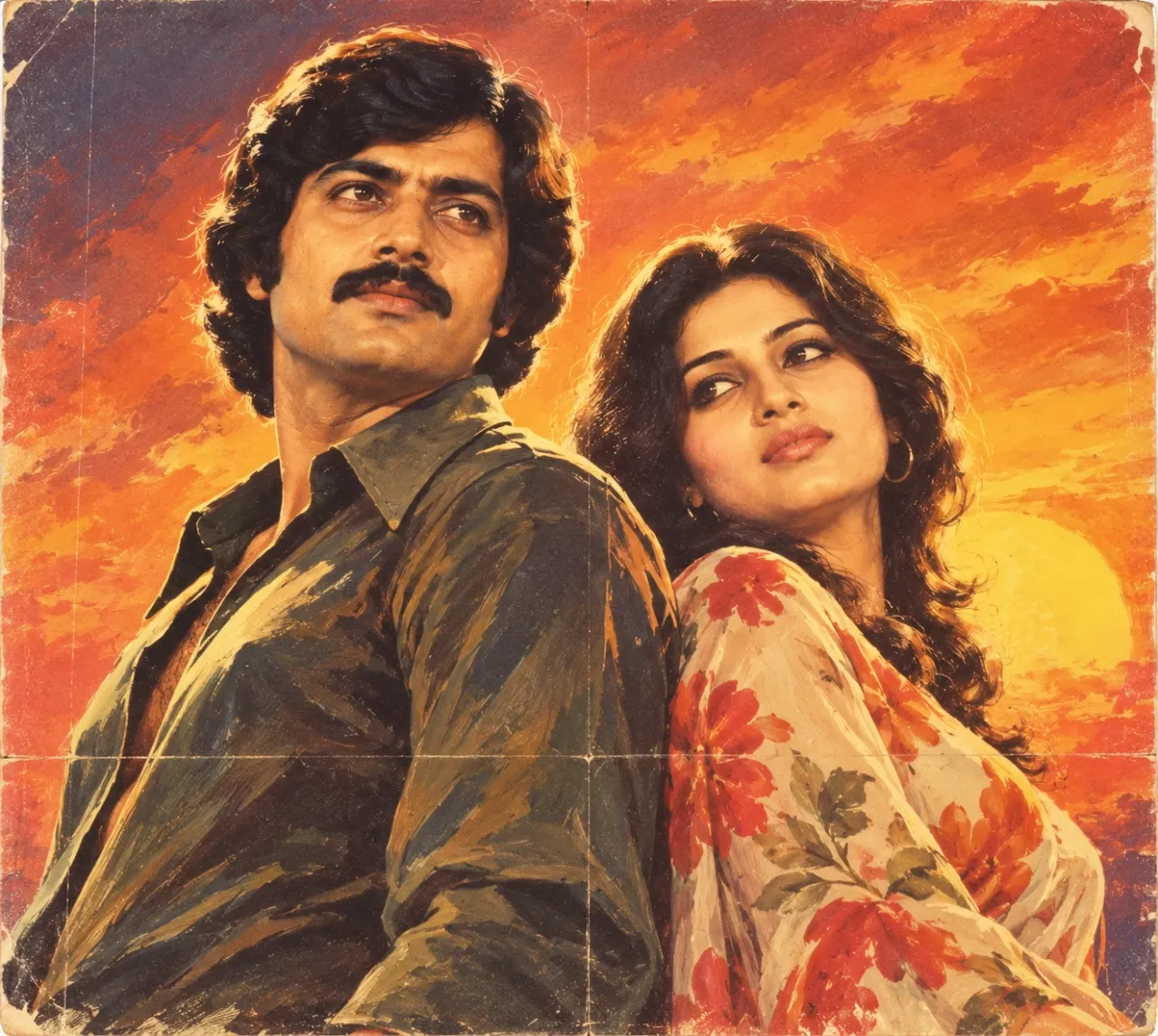
Vintage retro movie poster couple
Convert this couple photo into a vintage Indian movie poster from the 1970s: painted art style, warm saturated colours, a dramatic back-to-back pose and soft halation on the highlights. Keep both faces unchanged and recognisable from the original photo.
What is a retro couple AI photo prompt?
It is a written instruction that tells an AI image tool how to make a couple photo look like it was shot decades ago. Instead of a clean modern edit, the prompt asks for film grain, faded colour and era-specific styling.
Retro edits are trending because they feel nostalgic and personal, like an old family album. These prompts work with any ordinary couple photo, and each one keeps both faces locked so the people in the picture stay recognisable. For more free picks, see the Editing Prompt homepage.
What each part of these prompts does
- Grain and faded colour. Removes the digital look and gives the warm, imperfect feel of old film.
- 1970s styling. Checked shirts, floral prints and soft waves place the photo in the vinyl era.
- 1990s flash. Harsh direct flash and deep shadows give the point-and-shoot snapshot feel.
- Painted poster style. Turns the couple into a dramatic 1970s movie poster with saturated colour.
- Do not change the faces. Keeps both people recognisable, repeated as a stronger lock in every prompt.
Which prompt should you pick?
- Anniversary or gift print: the 70s portrait, it looks best framed.
- Casual fun picture: the 90s flash snapshot.
- Dramatic profile post: the vintage movie poster.
If a face changes, add this line
Make sure the faces stay exactly the same. Paste it at the end of any prompt if the first result looks like someone else.
How to use these prompts in ChatGPT and Gemini
Open your AI tool
Use the ChatGPT or Gemini app or website, sign in and pick the image creation option.
Upload your photo
Add one sharp photo where both faces are clearly visible, with good light.
Paste the prompt
Paste the full prompt and send. If a face changes, add: make sure the faces stay exactly the same.
Pick the era
Ask for one change at a time, such as stronger grain for the 70s look or a brighter flash for the 90s look.
Save and share
Download the version you like. The 70s portrait and the poster look make great prints and profile pictures.
Easy ways to change the look
Change one phrase at a time and compare. These swaps are starting points, and results vary by tool.
- Era: try 1960s black and white, 1980s neon glow or a sepia 1950s feel.
- Outfits: name the vintage outfits, such as bell-bottoms and a polka dot dress.
- Grain: use heavy film grain for an aged look, or light grain for a cleaner retro feel.
- Poster text: add a dramatic movie title line at the top, like a 70s film name.
- Backdrop: swap the background for an old cinema hall, a vintage car or a classic street.
Fix common problems with retro prompts
Most problems come from the retro effect being too weak or a face drifting. Here is what to try first.
- It still looks modern. Add: heavy film grain, faded warm colours, visible dust scratches.
- A face looks different. Use one sharp, front-facing photo and add: make sure the faces stay exactly the same.
- The 90s flash is too soft. Repeat: harsh direct flash, deep shadows behind the couple.
- The poster looks too digital. Repeat: painted art style, hand-painted texture, no photo realism.
- Colours are too bright. Add: muted vintage palette, low saturation, warm colour cast.
AI results differ every run, so it is worth running the same prompt twice before you change it.
Retro couple prompt questions
What is a retro couple AI photo prompt?
It is a short written instruction that asks an AI image tool to turn a photo of two people into a vintage-style picture, like a 1970s film portrait, a 1990s flash snapshot or an old painted movie poster. The prompts on this page also keep both faces unchanged.
Will the retro filter change our faces?
No. Every prompt on this page says to keep both faces exactly the same. Use a sharp, front-facing photo so the AI has clear faces to copy.
Which retro style looks best for an anniversary post?
The 70s vinyl portrait usually wins for anniversaries: warm tones, soft glow and classic outfits make it feel timeless and gift-worthy.
Can I make a black and white retro version?
Yes. Add the line: convert to classic black and white with film grain and soft contrast, at the end of any prompt.
ChatGPT or Gemini, which is better for retro edits?
Both can follow the same text. Results differ between them, so if one makes the picture too modern or changes a face, run the same prompt in the other and compare.
Is it free, and is it okay to edit a partner’s photo?
The prompts are free to copy, with no sign-up. ChatGPT and Gemini both offer some free image access, but limits can change, so check the app. Only edit photos of people who agree to it, and check the tool’s privacy settings before uploading.
Recent posts
Diwali Celebration Couple AI Photo Prompt
Retro 70s Bollywood Couple AI Photo Prompt
Desert Safari Couple AI Photo Prompt
Want more? Browse every free prompt on Editing Prompt.