Couple Diwali Celebration AI Photo Prompt (2026)
Celebrate Diwali with a glowing couple portrait full of diyas, fairy lights and festive outfits. Copy a prompt, paste it in ChatGPT or Gemini with your photo, and you are done.
Quick answer
What is a couple Diwali celebration AI photo prompt? It is a festive prompt that asks an AI tool to restyle a couple photo with Diwali elements: glowing diyas, fairy lights, traditional outfits and a warm celebratory glow. Copy one of the 4 prompts below, upload a clear couple photo to ChatGPT or Gemini, and keep the line that says do not change the faces.
Couple Diwali celebration AI photo prompt: 4 looks
Four looks, four prompts. Tap Copy prompt, open ChatGPT or Gemini, upload your couple photo and paste.

Diya lit Diwali portrait
Create a Diwali celebration portrait of this couple. Show them holding lit diyas, warm golden glow on their faces, fairy lights and marigold decorations in the background. Both in traditional festive outfits. Do not change their faces. Rich, warm, celebratory feel, high detail.
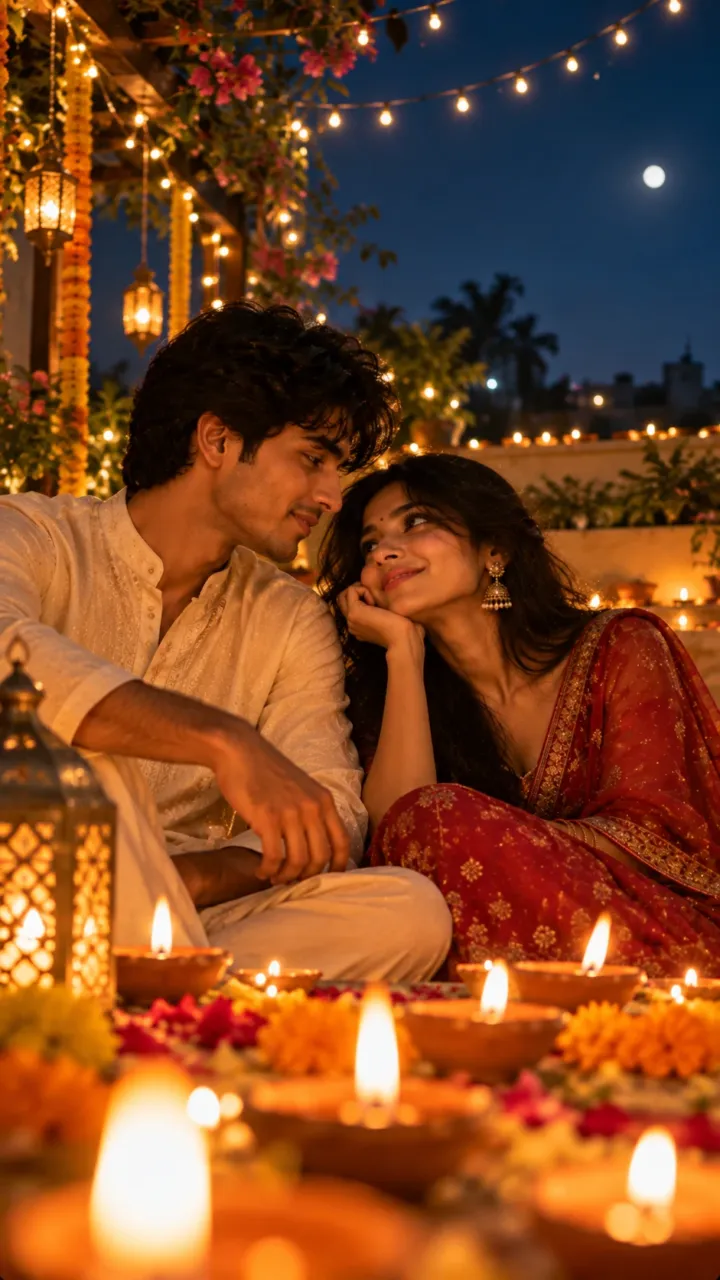
Fairy light bokeh night
Edit this couple photo into a Diwali night scene. Surround them with warm fairy light bokeh, diyas glowing in the foreground, deep blue night sky behind. Keep both faces exactly the same. Romantic festive mood, cinematic lighting.

Traditional outfit celebration
Turn this into a traditional Diwali couple portrait. Dress them in elegant festive Indian outfits, she in a glowing lehenga and he in a kurta, standing before a decorated doorway with torans and diyas. Do not change the faces. Bright, joyful, detailed.

Sparkler moment together
Make a fun Diwali sparkler photo of this couple. Show them holding lit sparklers at night, sparks flying, big smiles, casual festive clothes. Keep both faces unchanged. Lively, candid, full of light trails.
What is a couple Diwali celebration AI photo prompt?
It is a written instruction that tells an AI image tool to give your couple photo a Diwali makeover. Diyas, fairy lights, marigolds and festive outfits turn an ordinary photo into a celebration portrait.
Diwali photos trend every year, and AI makes them easy: one clear couple photo becomes a glowing festive portrait in seconds. For more free picks, see the Editing Prompt homepage.
What each part of these prompts does
- Lit diyas. The glowing oil lamps are the heart of every Diwali edit.
- Fairy light bokeh. Warm blurred lights add the festive sparkle.
- Traditional outfits. Lehenga, kurta or saree complete the look.
- Do not change the faces. Keeps both people recognisable.
- Warm golden glow. Ties the whole scene together.
Which prompt should you pick?
- For a classic Diwali post: the diya lit portrait.
- For romance: the fairy light bokeh night.
- For family sharing: the traditional outfit celebration.
- For fun: the sparkler moment.
If a face changes, add this line
Make sure both faces stay exactly the same. Paste it at the end of any prompt if the first result looks like someone else.
How to use these prompts in ChatGPT and Gemini
Open your AI tool
Use the ChatGPT or Gemini app or website, sign in and pick the image creation option.
Upload your photo
Add one sharp photo where faces are clearly visible, with good light.
Paste the prompt
Paste the full prompt and send. If a face changes, add: make sure the faces stay exactly the same.
Adjust and save
If it is close, ask for one change, then download the version you like.
Easy ways to change the look
Change one phrase at a time and compare. These swaps are starting points, and results vary by tool.
- Outfits: name the colors, such as red and gold, for a richer result.
- Setting: try a balcony, courtyard or temple steps.
- Lights: ask for lanterns instead of fairy lights for variety.
- Pose: holding diyas together, forehead touch or laughing.
- Time: dusk gives the best glow against the lights.
Fix common problems with Diwali prompts
Most problems come from extra faces or messy lights. Here is what to try first.
- A face looks different. Use one sharp photo and add: do not change either face.
- Too many diyas. Repeat: a few glowing diyas in the foreground, clean background.
- Outfits look wrong. Name them clearly: she in a red lehenga, he in a cream kurta.
- Light looks harsh. Ask for: soft warm glow, gentle on faces.
- Extra people appeared. Repeat: only the couple, no other people.
AI results differ every run, so it is worth running the same prompt twice before you change it.
Couple Diwali prompt questions
What is a couple Diwali celebration AI photo prompt?
It is a festive prompt that restyles a couple photo with Diwali elements like diyas, fairy lights and traditional outfits, using an AI image tool.
Which tool should I use?
ChatGPT and Gemini both work. Upload a clear couple photo, paste the prompt, and compare results.
Is it free?
The prompts are free to copy, with no sign-up. Both apps offer some free image access, though limits can change.
How do I keep both faces the same?
Upload one sharp photo showing both faces clearly, and keep the line do not change the faces in the prompt.
Can I choose the outfits?
Yes. Name the outfits and colors in the prompt for a more exact festive look.
When should I post Diwali photos?
Diwali 2026 is near, so post in the week before the festival for the most engagement.
Can I use a single photo instead?
Yes, but these prompts are written for couples. For solo Diwali looks, check our festive photo prompts.
Is it okay to edit festival photos?
Yes for your own photos. Only edit pictures of people who agree to it.
Recent posts
Couple Monsoon Rain AI Photo Prompt

Couple Long Drive AI Photo Prompt

Floating Music Player AI Photo Prompt
Want more? Browse every free prompt on Editing Prompt.