Aesthetic Girl AI Photo Editing Prompt (2026)
Turn one selfie into a mirror selfie collage, a black-and-white Polaroid set or a golden hour sunflower portrait. Copy a prompt, paste it in Gemini or ChatGPT with your photo, and you are done.
Quick answer
An aesthetic girl AI photo editing prompt is a short text that asks an AI tool such as Gemini or ChatGPT to restyle one uploaded photo as a themed portrait, like a Gen-Z mirror selfie collage, a vintage Polaroid set or a golden hour scene. Copy a prompt below, upload one sharp photo of yourself, and keep the face the same as the original.
Aesthetic girl AI photo editing prompt: 3 looks
Three looks, three prompts. Tap Copy prompt, open Gemini or ChatGPT, upload your photo and paste.
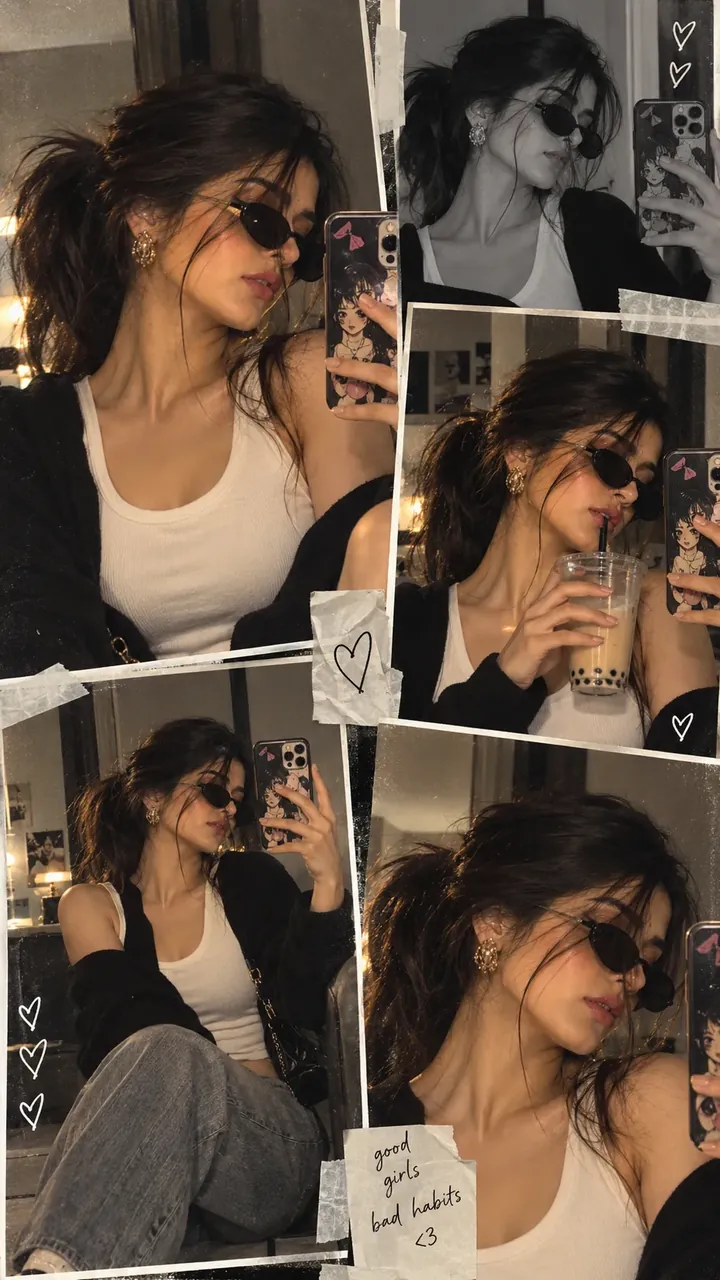
Mirror selfie collage prompt
Turn this photo into an ultra-realistic 9:16 mirror selfie collage of the same woman, same face as the uploaded photo. Playful, confident vibe, messy ponytail, black oval sunglasses, white sleeveless top with a black sweater draped over one shoulder, holding a phone with an anime-style case, one frame holding iced bubble tea. Layer several cropped mirror selfies, mixing black-and-white and muted color frames, imperfect Tumblr-style alignment, soft indoor lighting, subtle grain, cozy Gen-Z aesthetic, 8K DSLR quality.
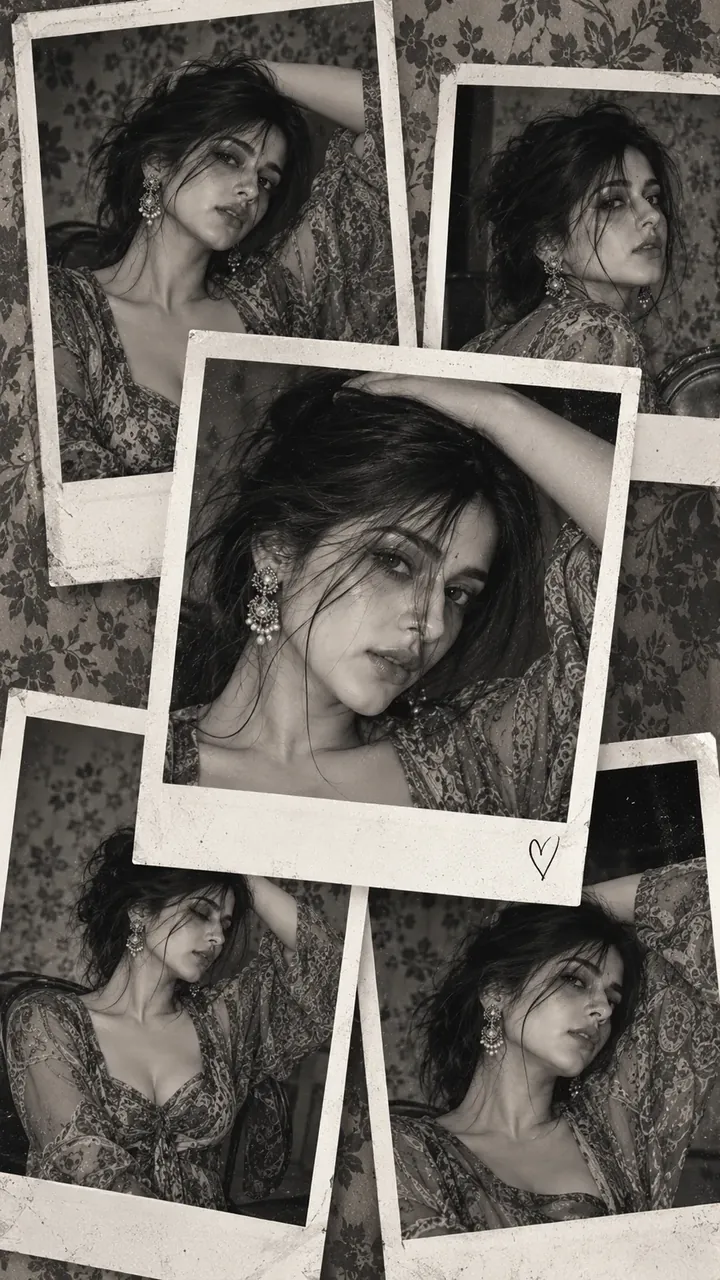
Vintage black and white Polaroid collage
Turn this photo into an ultra-realistic black-and-white Polaroid collage portrait of the same woman, same face as the uploaded photo. Confident pose, one arm raised resting in her hair, semi-sheer bohemian paisley blouse, direct eye contact. Layer overlapping white-bordered Polaroid frames at different angles, with the central frame sharply cropping her face and eyes. Vintage floral wallpaper background, soft studio lighting, rich grayscale contrast, nostalgic early-2000s editorial mood, 8K DSLR quality, fine film grain.
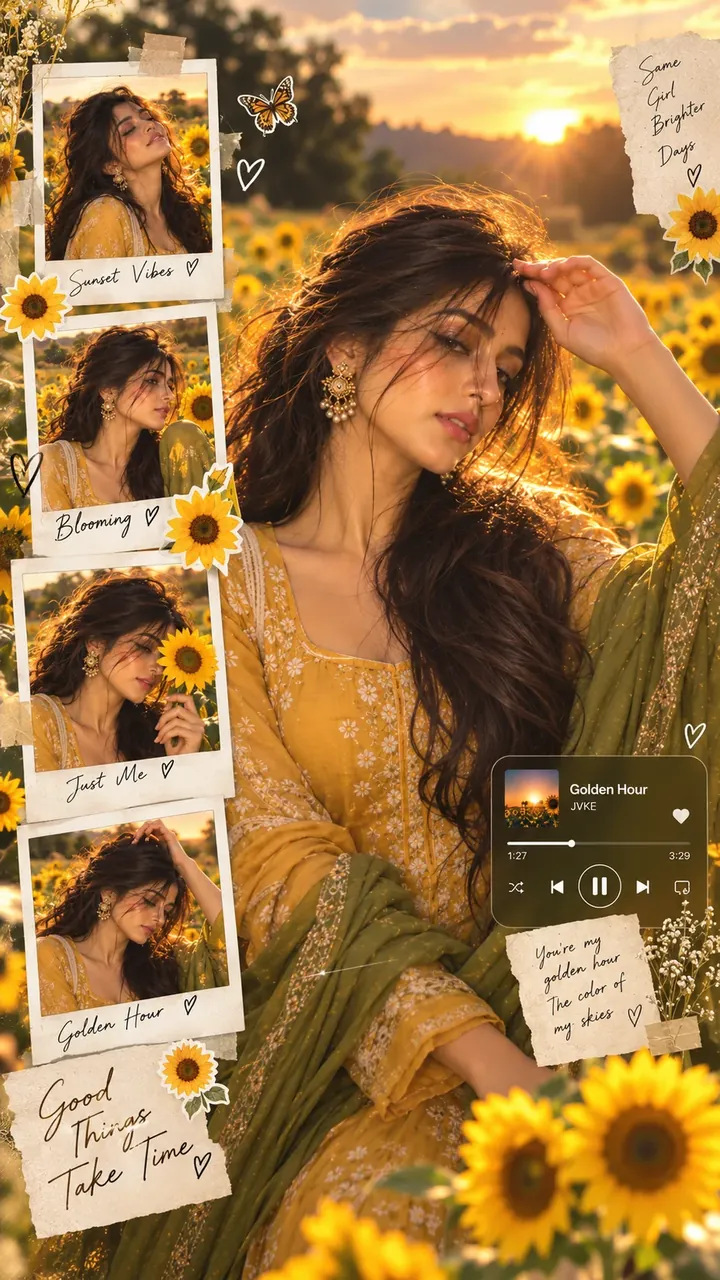
Golden hour sunflower garden portrait
Turn this photo into an ultra-realistic 4:5 golden-hour portrait of the same woman, same face as the uploaded photo, standing in a sunflower garden. Wavy hair, soft smile, one hand shielding sunlight, wearing a mustard yellow kurta with an olive-green dupatta. Add a Polaroid photo-strip on the left with four smaller candid poses, a pastel name caption, sunflower stickers, and a Spotify-style music card on the right with a song title and short lyric snippet. Warm golden lighting, dreamy glow, cheerful Instagram-influencer mood, 8K DSLR quality, shallow depth of field.
What is an aesthetic girl AI photo editing prompt?
It is a written instruction that tells an AI image tool how to rebuild your photo as a styled, shareable picture. Instead of editing layers by hand, you describe the layout, the outfit, the light and the mood, and the tool draws it around your face.
The three looks here come from popular Instagram habits: the messy mirror selfie dump, the film-style Polaroid wall and the sunset story post. Each one is a layout first and an outfit second, which is why the prompts spend as many words on frames, stickers and grain as on clothes. For more free picks, see the Editing Prompt homepage.
What each part of these prompts does
- Aspect ratio first. 9:16 fits Reels and Stories, and 4:5 fits a feed post, so the tool plans the layout for the right shape.
- Same face as the uploaded photo. The line that ties the result to you and stops a new face from appearing.
- Outfit and props. Sunglasses, a draped sweater, a phone case or a mustard kurta give each look its identity.
- Layout words. Layered frames, Polaroid borders, a photo-strip and a music card tell the tool how to arrange the picture.
- Light and grain. Soft indoor light, rich grayscale or warm golden light sets the mood, and fine grain adds the film feel.
- A quality tag. 8K DSLR quality asks for sharp skin and fabric detail.
Which prompt should you pick?
- Casual photo dump or profile picture: the mirror selfie collage.
- Moody, close-up portrait: the vintage black-and-white Polaroid collage.
- Festive or traditional outfit, Stories and feed posts: the golden hour sunflower portrait.
If the face drifts, add this line
Keep my face and features exactly the same as the reference photo. Repeat it at the end of the prompt if the first result looks like someone else.
How to use these prompts in Gemini and ChatGPT
Open your AI tool
Use the Gemini or ChatGPT app or website, sign in and pick the image creation option.
Upload your photo
Add one sharp, front-facing photo with good light. These prompts keep your face from this photo.
Paste the prompt
Paste the full prompt and send. If the face drifts, add the face-lock line from this page.
Adjust and save
If it is close, ask for one change, such as softer grain or warmer light. Then download the version you like.
Easy ways to change the look
Change one phrase at a time and compare. These swaps are starting points, and results vary by tool.
- Outfit: swap the white top and black sweater for a denim jacket, or the mustard kurta for a pastel one.
- Setting: move the golden hour scene from a sunflower garden to a beach or a rooftop.
- Colour mood: make the mirror collage all black-and-white, or ask for warm film tones in the Polaroid set.
- Crowding: ask for fewer frames, such as three instead of several, for a cleaner layout.
- Format: change 9:16 to 4:5 for a feed post, or 4:5 to 9:16 for a Story.
Fix common problems with girl photo prompts
Most problems come from a weak photo or a crowded prompt. Here is what to try first.
- The face does not look like me. Use one sharp, front-facing photo and add the face-lock line.
- The collage is too messy. Ask for fewer frames and one clear main picture.
- The caption or song text is misspelled. Use two or three large words, or remove the text and add it later in a phone app.
- The black-and-white look is flat. Add rich grayscale contrast and soft studio lighting.
- The skin looks too smooth. Add: natural skin texture.
- The shape is wrong. Keep the ratio in the first line and pick the matching size in the tool if it offers one.
AI results differ every run, so it is worth running the same prompt twice before you change it.
Girl photo prompt questions
What is an aesthetic girl AI photo editing prompt?
It is a short written instruction that asks an AI image tool to restyle your photo as a themed portrait or collage, such as a mirror selfie, a black-and-white Polaroid set or a golden hour scene. Each prompt on this page names the outfit, the layout, the light and the mood.
Do I need to upload my own photo?
Yes. These prompts ask for the same face as the uploaded photo, so upload one sharp, front-facing photo first. Without a photo, the tool will invent a face.
Which AI tool works best for these prompts, Gemini or ChatGPT?
Both can follow the same text. Results differ between them, so if one gives a layout that is too crowded or a face that drifts, run the same prompt in the other and compare.
How do I stop the face from changing?
Use one sharp, well-lit, front-facing photo, and add the line keep my face and features exactly the same as the reference photo. Avoid sunglasses or heavy shadows on the face in the photo you upload.
Why does my result not look like the examples?
Your photo, the tool and its current version all change the outcome, so results are close but never identical. Blurry or dark photos and prompts with extra changes added are the usual causes. Try a clearer photo and run the prompt again.
What size should I use for these portraits?
The mirror selfie collage asks for vertical 9:16, which fits Reels, Stories and wallpapers, and the golden hour portrait asks for 4:5, which suits an Instagram feed post. Change the ratio in the first line of the prompt if you need the other one.
Can I add my own name or song on the golden hour card?
Yes. Replace the pastel name caption and the song title with your own short words. AI tools often misspell long text, so keep it to a few large words, and write your own line instead of pasting someone else’s lyrics.
Is it free, and is it safe to upload my photo?
The prompts are free to copy, with no sign-up. Gemini and ChatGPT both offer some free image access, but limits can change, so check the app. Only upload photos you are comfortable sharing, check the tool’s privacy settings, and never upload ID cards or private documents.
Recent posts
Aesthetic Blurry Saree AI Photo Editing Prompt
Gemini Couple Photo Editing Prompts
Kids AI Photo Editing Prompts for Gemini
Want more? Browse every free prompt on Editing Prompt.