AI Couple Portrait Prompt for Instagram (4 Free Prompts)
Turn a couple photo into a feed-ready Instagram portrait, editorial light, aesthetic settings and sharp detail, with both faces kept the same. Copy a prompt, paste it in ChatGPT or Gemini with your photo, and you are done.
Quick answer
An AI couple portrait prompt for Instagram is a short text that asks an AI tool such as ChatGPT or Gemini to restyle a photo of two people as a polished, feed-ready portrait, with editorial lighting and aesthetic backdrops. Copy a prompt below, upload one sharp photo of the couple, and keep the line that says not to change the faces.
ai couple portrait prompt for instagram: 4 looks
Four looks, four prompts. Tap Copy prompt, open ChatGPT or Gemini, upload your photo and paste.

Golden hour field editorial
Turn this couple photo into an editorial Instagram portrait at golden hour. Place the couple in a wheat field with soft sunlight behind them, wind in their hair, shot like a fashion magazine cover. Do not change the faces. Keep the tones warm and the detail sharp.
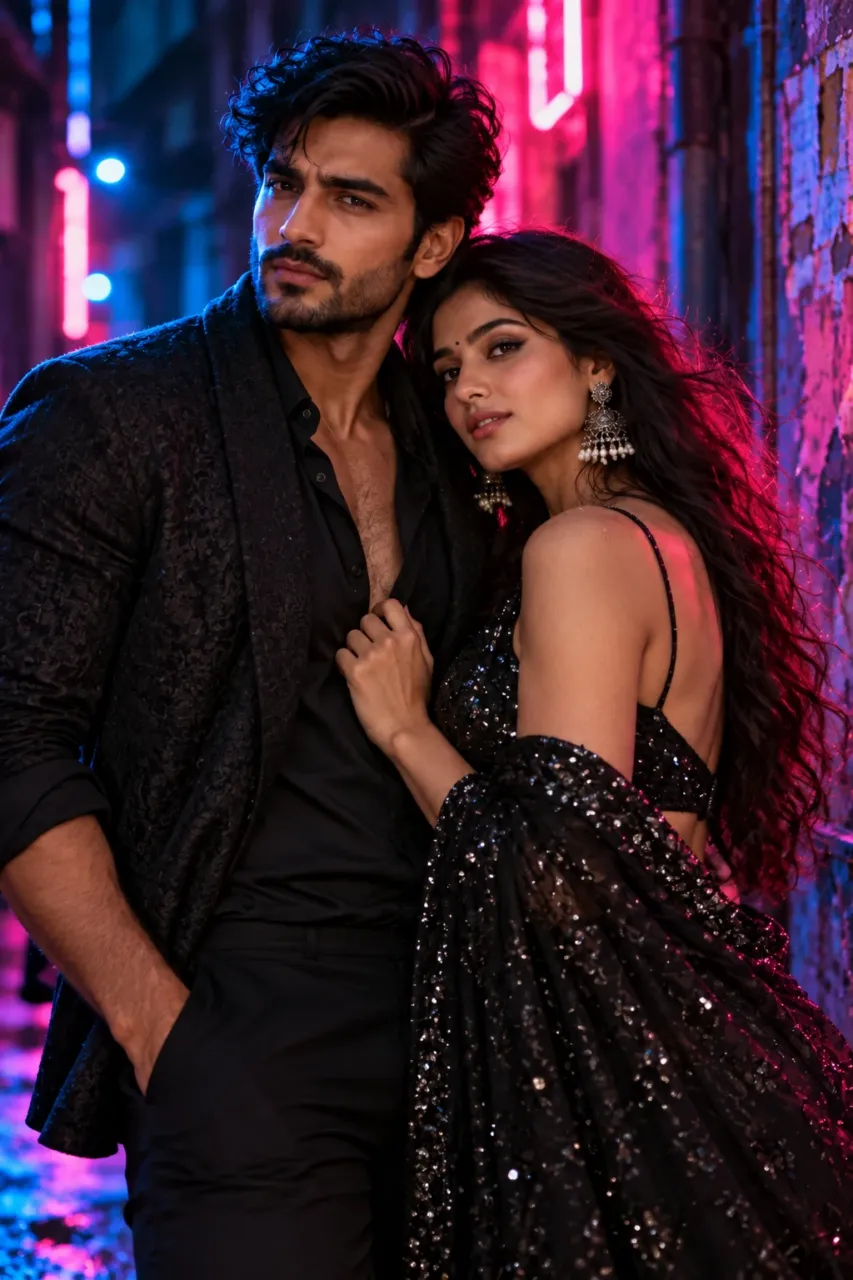
Neon alley night portrait
Turn this couple photo into a bold Instagram night portrait. Place the couple against a neon-lit alley wall in blue and pink light, with a moody cinematic feel. Do not change the faces. Keep the colours vivid and the faces clearly lit.

Mirror reflection cafe shot
Turn this couple photo into an aesthetic Instagram mirror shot. Show the couple taking a mirror selfie in a stylish cafe, with the mirror reflection as the main frame and warm interior light. Do not change the faces. Keep the composition clean and trendy.

Soft window light portrait
Turn this couple photo into a soft Instagram portrait by a large window. Let gentle daylight fall across their faces, with a blurred green outdoor background. Do not change the faces. Make sure the faces stay exactly the same.
What is an AI couple portrait prompt for Instagram?
It is a written instruction that tells an AI image tool how to turn a couple photo into a polished Instagram-ready portrait. Instead of a casual snap, the prompt aims for editorial light, clean composition and aesthetic backdrops that stop the scroll.
Instagram portraits win with light and framing. These prompts use words like golden hour, neon glow and soft window light for that feed-ready polish, while the face-lock line keeps the couple recognisable. For more free picks, see the Editing Prompt homepage.
What each part of these prompts does
- Editorial lighting. Golden hour, neon and window light each give a different premium feel.
- Aesthetic backdrops. Fields, alleys, cafes and windows frame the couple without clutter.
- Sharp detail. Feed portraits need clean, crisp faces, so these prompts ask for sharp detail.
- Do not change the faces. Keeps both people recognisable, and the fourth prompt repeats it as a stronger lock.
- Clean composition. Simple framing keeps attention on the couple, not the background.
Which prompt should you pick?
- Warm feed aesthetic: the golden hour field editorial.
- Bold night look: the neon alley night portrait.
- Trendy casual post: the mirror reflection cafe shot.
- When a face keeps changing: the soft window light prompt, which repeats the face-lock line.
If a face changes, add this line
Make sure the faces stay exactly the same. Paste it at the end of any prompt if the first result looks like someone else.
How to use these prompts in ChatGPT and Gemini
Open your AI tool
Use the ChatGPT or Gemini app or website, sign in and pick the image creation option.
Upload your photo
Add one sharp photo where both faces are clearly visible, with good light.
Paste the prompt
Paste the full prompt and send. If a face changes, add: make sure the faces stay exactly the same.
Try another look
Run a second prompt from this page on the same photo to compare portrait styles.
Adjust and save
If it is close, ask for one change, such as softer light or a tighter crop. Then download the version you like.
Easy ways to change the look
Change one phrase at a time and compare. These swaps are starting points, and results vary by tool.
- Light: swap golden hour for blue hour, neon or soft daylight.
- Backdrop: move the portrait to a beach, a rooftop or an old street.
- Outfits: name the outfits, such as white shirts and denim, for a clean feed look.
- Crop: ask for a close crop, a half-body frame or a wide cinematic frame.
- Mood: change joyful to calm, bold or dreamy.
Fix common problems with ai couple portrait prompt for instagram prompts
Most problems come from the result looking off or from a face drifting. Here is what to try first.
- A face looks different. Use one sharp, front-facing photo and add: make sure the faces stay exactly the same.
- The photo looks dull. Add: editorial lighting, sharp detail, vibrant but natural colours.
- The background is messy. Repeat: clean blurred background, no distractions.
- Neon light is too harsh. Add: faces clearly lit, soft neon glow, balanced exposure.
- The crop is odd. Ask for a standard portrait crop with both faces fully visible.
AI results differ every run, so it is worth running the same prompt twice before you change it.
What is an AI couple portrait prompt for Instagram questions
What is an AI couple portrait prompt for Instagram?
It is a short written instruction that asks an AI image tool to turn a photo of two people into a polished, feed-ready portrait, with editorial lighting and aesthetic backdrops, while keeping both faces unchanged.
Do these prompts work in both ChatGPT and Gemini?
Yes. Both can follow the same text. Results differ between them, so if one changes a face, run the same prompt in the other and compare.
How do I keep both faces the same?
Use a sharp, front-facing photo and keep the line do not change the faces in the prompt. The fourth prompt adds make sure the faces stay exactly the same, which you can paste at the end of any of the four.
Which prompt gets the most aesthetic look?
The golden hour field editorial, with warm sunlight and magazine-style framing, looks the most premium on a feed.
Can I use these for profile pictures too?
Yes. The soft window light and golden hour portraits both work well as couple profile pictures.
Is it free, and is it okay to edit a partner’s photo?
The prompts are free to copy, with no sign-up. ChatGPT and Gemini both offer some free image access, but limits can change, so check the app. Only edit photos of people who agree to it, and check the tool’s privacy settings before uploading.
Recent posts
College Campus Couple AI Photo Prompt

Trending AI Photo Prompt

New Trending Photo Editing Prompt
Want more? Browse every free prompt on Editing Prompt.