Couple DP AI Photo Prompt (2026)
Get a profile picture made for two: a matching split-frame avatar or a cosy close-up crop, with both faces kept exactly the same. Copy a prompt, paste it in ChatGPT or Gemini with your photo, and set your new couple DP in minutes.
Quick answer
A couple DP AI photo prompt is a short instruction that asks an AI tool such as ChatGPT or Gemini to restyle a photo of two people into a display picture that works at small sizes, like a matching split frame or a cosy close-up. Upload one clear couple photo, paste one of the prompts below, and keep the line that says not to change the faces.
Couple DP AI photo prompt: 2 looks
Two DP-ready looks, two prompts. Tap Copy prompt, open ChatGPT or Gemini, upload your photo and paste.

Matching split frame couple DP
Turn this couple photo into a matching split-frame couple DP: two vertical halves side by side, one showing each person, with matching warm tones and a soft gradient background. Keep both faces exactly the same, do not change their identity.
Cosy close-up couple DP
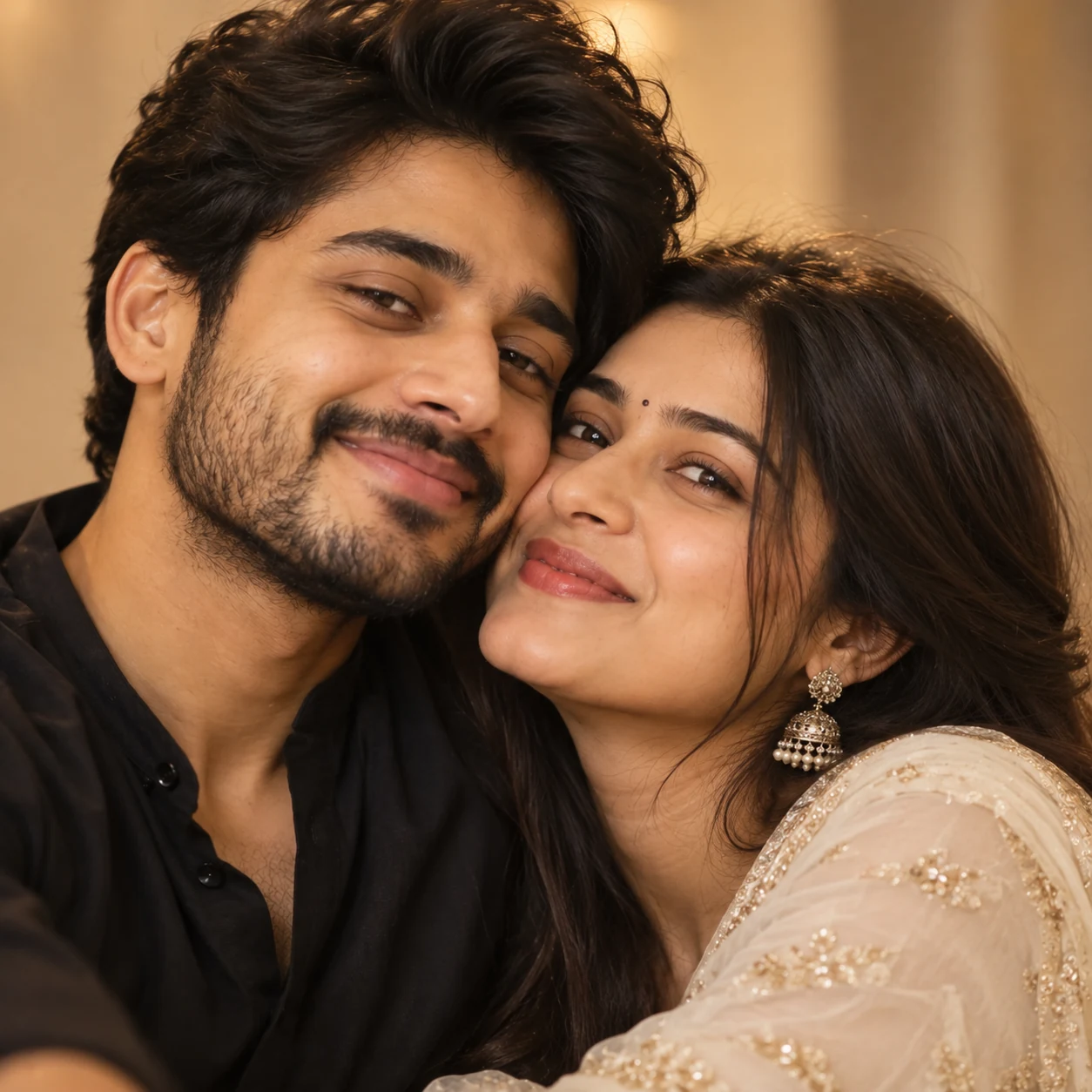
Restyle this couple photo as a cosy close-up couple DP: the couple cheek to cheek, softly cropped in square format, warm gentle light, and a clean blurred background that stays clear at small sizes. Do not change the faces, keep them identical to the original photo.
What is a couple DP AI photo prompt?
It is a written instruction that tells an AI image tool how to turn a couple photo into a display picture. The prompt focuses on tight framing, clean backgrounds and matching tones that stay clear in a tiny circle.
A regular photo often looks messy when cropped into a DP. These prompts rebuild the framing and background for small sizes, and each one keeps both faces locked so the couple stays recognisable. For more free picks, see the Editing Prompt homepage.
What each part of these prompts does
- Split frame. Gives each person their own half, so both faces stay big and clear.
- Square crop. Matches the DP frame, so nothing important gets cut.
- Matching tones. One colour mood across both halves makes it look like a set.
- Clean blurred background. Keeps the tiny circle readable on any chat screen.
- Do not change the faces. Keeps both people recognisable, repeated as a stronger lock in every prompt.
Which prompt should you pick?
- Matching profile set: the split frame, each of you can also use one half.
- One shared DP: the cosy close-up, it reads best in a small circle.
If a face changes, add this line
Make sure the faces stay exactly the same. Paste it at the end of any prompt if the first result looks like someone else.
How to use these prompts in ChatGPT and Gemini
Open your AI tool
Use the ChatGPT or Gemini app or website, sign in and pick the image creation option.
Upload your photo
Add one sharp photo where both faces are clearly visible, with good light.
Paste the prompt
Paste the full prompt and send. If a face changes, add: make sure the faces stay exactly the same.
Check the small size
Zoom out or preview the result small, and ask for a tighter crop if a face gets lost.
Set as DP
Download the square result and set it as your display picture on WhatsApp or Instagram.
Easy ways to change the look
Change one phrase at a time and compare. These swaps are starting points, and results vary by tool.
- Background: try a soft sunset gradient, a plain pastel colour or a blurred city night.
- Style: add a soft cartoon or illustrated filter for a playful DP.
- Outfits: name matching outfits, such as white shirts for both.
- Frame: add a thin white or gold ring border around the circle crop.
- Mood: swap the pose to forehead touch, back hug or laughing together.
Fix common problems with couple DP prompts
Most problems come from faces getting too small or a face drifting. Here is what to try first.
- Faces are too small. Add: tight crop on both faces, faces fill most of the frame.
- A face looks different. Use one sharp, front-facing photo and add: make sure the faces stay exactly the same.
- Background is messy. Repeat: clean blurred background, no text, no objects.
- Halves do not match. Repeat: matching warm tones on both halves, same lighting.
- Too dark for a DP. Add: bright even lighting, faces clearly visible.
AI results differ every run, so it is worth running the same prompt twice before you change it.
Couple DP prompt questions
What is a couple DP AI photo prompt?
It is a short written instruction that asks an AI image tool to turn a photo of two people into a display picture, like a matching split frame or a cosy close-up. The prompts on this page also keep both faces unchanged.
Which style works best for WhatsApp?
The cosy close-up usually wins for WhatsApp, because one shared circle with two clear faces reads best at tiny sizes.
Can we each use half of the split frame?
Yes. The split frame is designed for that: each half works as a matching solo DP with the same tones.
Will our faces stay the same?
Yes. Every prompt on this page says to keep both faces exactly the same. Use a sharp, front-facing photo so the AI has clear faces to copy.
Is it free, and is it okay to edit a partner’s photo?
The prompts are free to copy, with no sign-up. ChatGPT and Gemini both offer some free image access, but limits can change, so check the app. Only edit photos of people who agree to it, and check the tool’s privacy settings before uploading.
Recent posts
Navratri Garba Couple Pink Outfit Dandiya
Navratri Garba AI Photo Editing Prompt
Polaroid Couple Photo Editing Prompt
Want more? Browse every free prompt on Editing Prompt.