Mirror Selfie Couple AI Photo Prompt (2026)
Turn a plain couple photo into a romantic mirror selfie, warm restaurant glow, bright bedroom daylight or a stylish night-out elevator shot, with both faces kept exactly the same. Copy a prompt below, paste it into ChatGPT or Gemini with your photo, and you are done.
Quick answer
A mirror selfie couple AI photo prompt is a short instruction that tells an AI image tool to restyle your photo as a mirror selfie: the phone in hand, a realistic mirror reflection and a romantic setting, while keeping both faces unchanged. Copy one of the 3 prompts below, upload one clear photo of the couple, and keep the line that says do not change the faces.
Mirror selfie couple AI photo prompt: 3 looks
Three settings, three prompts. Tap Copy prompt, open ChatGPT or Gemini, upload your photo and paste.
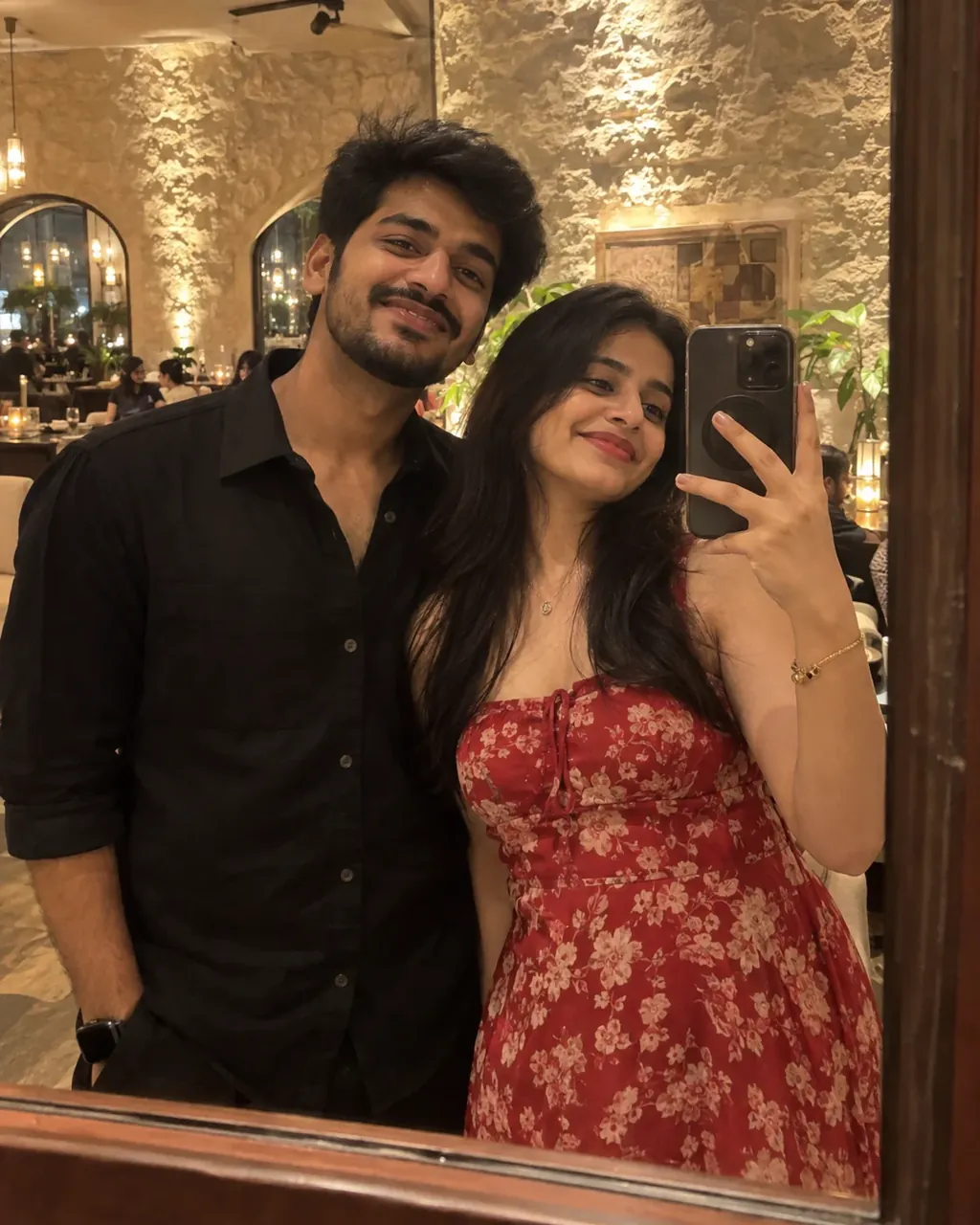
Warm restaurant mirror selfie
Turn our photo into a romantic mirror selfie taken in a cozy restaurant in the evening. The woman holds the phone at a natural selfie angle in front of a large mirror, the man stands close beside her, both smiling warmly at the reflection. Warm ambient lighting, softly blurred restaurant background with glowing lights. Keep both faces exactly the same as the uploaded photo, do not change, beautify or reshape them. Realistic mirror reflection, natural skin texture, vertical 4:5 photo.
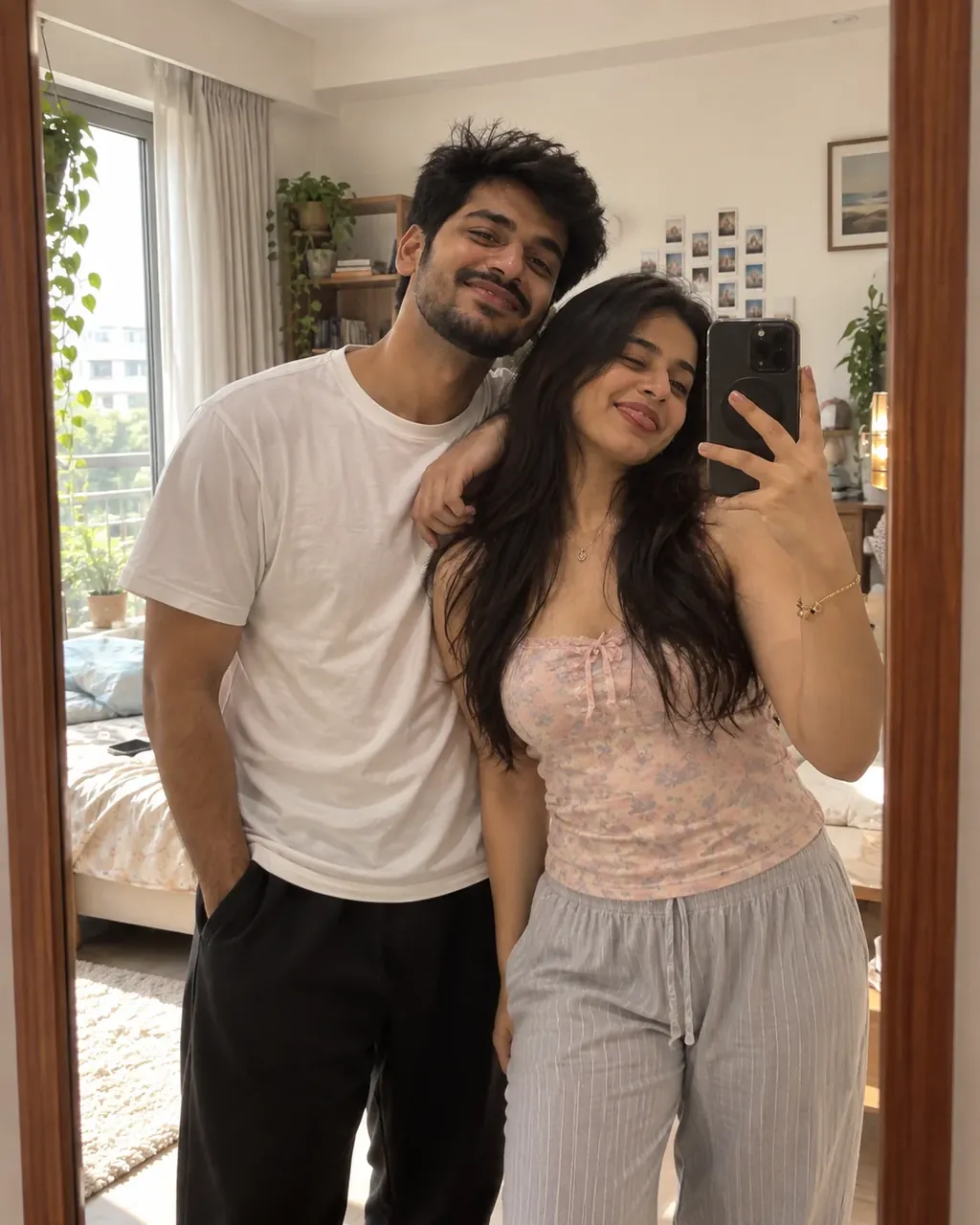
Bright bedroom mirror selfie
Turn our photo into a cheerful mirror selfie in a bright modern bedroom during the day. Soft morning daylight from a window, full-length mirror with a wooden frame, the couple in casual outfits posing playfully close together, one of them holding the phone. Cozy home interior, natural relaxed expressions. Keep both faces exactly the same as the uploaded photo, do not change, beautify or reshape them. Realistic reflection, sharp natural detail, vertical 4:5 photo.
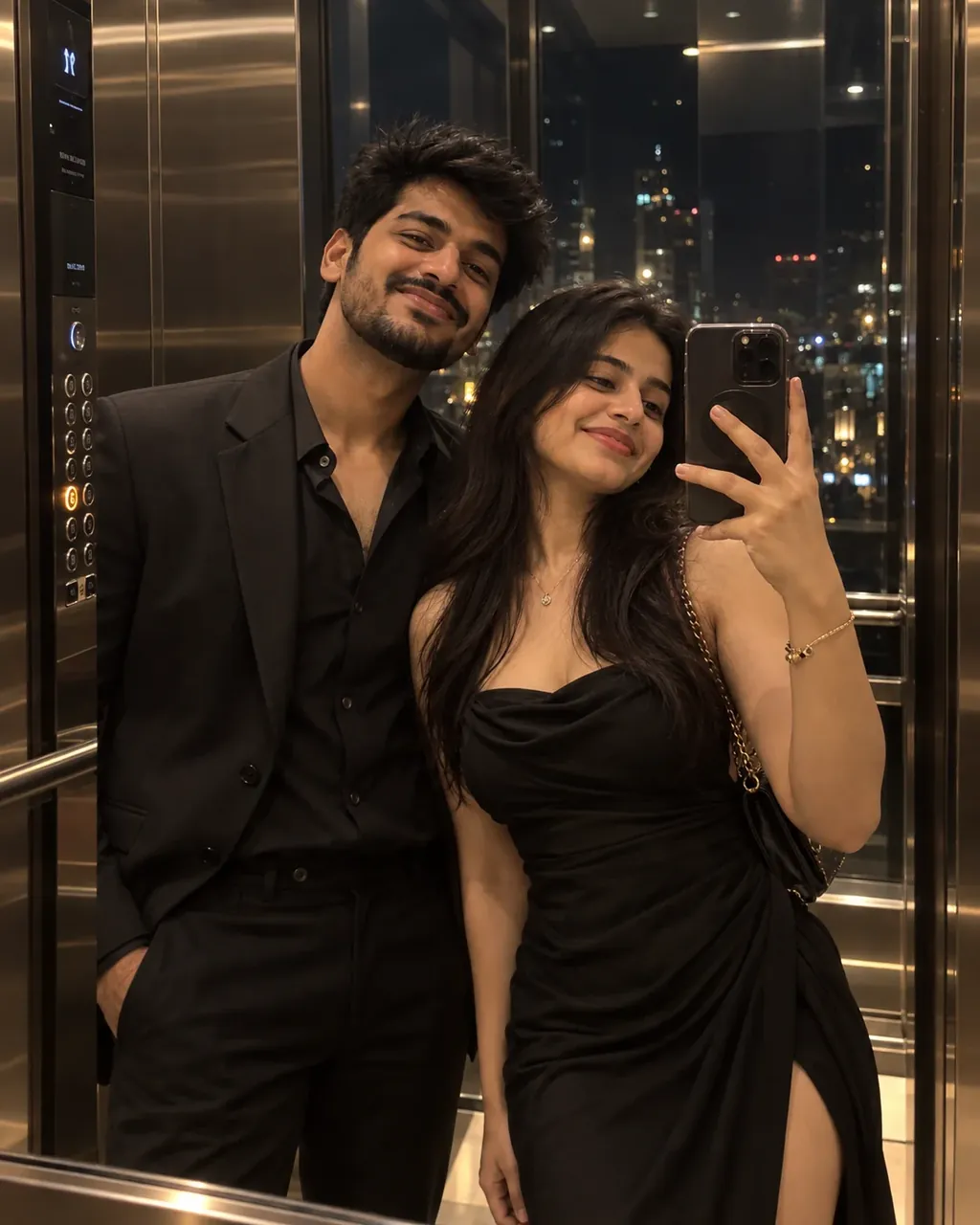
Night elevator mirror selfie
Turn our photo into a stylish mirror selfie inside an elevator at night. The couple dressed for a night out, confident poses, one holding the phone up to the mirror, city lights glowing softly in the background. Dramatic night lighting with gentle highlights on their faces. Keep both faces exactly the same as the uploaded photo, do not change, beautify or reshape them. Realistic mirror reflection, cinematic tones, vertical 4:5 photo.
What is a mirror selfie couple AI photo prompt?
It is a written instruction that tells an AI image tool to turn a regular couple photo into a mirror selfie. The phone stays visible in someone’s hand, the mirror shows a believable reflection, and a romantic scene fills the space around it.
Mirror selfies are tricky for AI because the reflection has to match the people. These prompts spell out the reflection, the phone angle and the lighting, so the result looks like a real photo instead of a broken mirror. For more free picks, see the Editing Prompt homepage.
What each part of these prompts does
- Turn our photo into a mirror selfie. Sets the whole idea in one line, before any detail is added.
- The phone at a natural selfie angle. Puts the phone in a hand, so the reflection makes sense.
- Realistic mirror reflection. Stops the AI from drawing a mismatched or warped reflection.
- Keep both faces exactly the same. The face-lock, keeps both people recognisable.
- The setting line. Restaurant, bedroom or elevator decides the mood and the light.
- Vertical 4:5 photo. Keeps the familiar phone-photo shape.
Which prompt should you pick?
- Date-night post: the warm restaurant mirror selfie.
- Casual everyday picture: the bright bedroom selfie.
- Bold, stylish look: the night elevator selfie.
If a face changes, add this line
Make sure the faces stay exactly the same. Paste it at the end of any prompt if the first result looks like someone else.
How to use these prompts in ChatGPT and Gemini
Open your AI tool
Open the ChatGPT or Gemini app or website and choose the image option.
Upload your photo
Add one clear photo where both faces are easy to see, with good light.
Paste the prompt
Paste the full prompt and send. If a face shifts, add: make sure the faces stay exactly the same.
Adjust and save
If it is close, ask for one change, such as a different background or outfit. Then download the version you like.
Easy ways to change the look
Change one phrase at a time and compare. These swaps are starting points, and results vary by tool.
- Outfits: name them directly, such as matching black outfits for a night look, instead of leaving it open.
- Setting: swap the restaurant for a café, or the bedroom for a hotel room.
- Lighting: warm evening glow for romance, bright daylight for a fresh feel.
- Pose: hugging from behind, a cheek kiss, or laughing together.
- Phone angle: add holding the phone higher for a top-angle mirror selfie.
Fix common problems with mirror selfie prompts
Most problems come from a warped reflection or a drifting face. Here is what to try first.
- The reflection looks wrong. Repeat: realistic mirror reflection, phone in hand.
- A face looks different. Use one sharp, front-facing photo and add: make sure the faces stay exactly the same.
- The phone hand looks odd. Add: natural hand holding the phone, realistic proportions, then run it again.
- The background looks fake. Name a simpler setting with fewer details.
- The result looks too polished. Add: candid feel, natural skin texture, no beauty filter.
- The mirror is barely visible. Say: large clear mirror filling the frame behind them.
AI results differ every run, so it is worth running the same prompt twice before you change it.
Mirror selfie prompt questions
What is a mirror selfie couple AI photo prompt?
It is a short written instruction that tells an AI image tool to restyle a photo of two people as a mirror selfie, the phone visible in hand, a believable reflection in the mirror and a romantic setting, while keeping both faces unchanged.
Which photo should I upload?
One clear photo that shows both people with good light works best. If your tool accepts several images, you can upload one photo of each person. The prompt keeps the faces the same, so the tool needs sharp faces to copy.
How do I keep both faces the same?
Use a sharp, front-facing photo and keep the line keep both faces exactly the same in the prompt. If a face still drifts, paste make sure the faces stay exactly the same at the end and run it again.
Why does the phone look strange in my result?
AI tools often struggle with small objects like phones. Add the line phone held naturally with realistic proportions to the prompt, and generate once more, the second run is often cleaner.
Can I change the outfits or the place?
Yes. Name the outfits directly in the prompt, such as matching black outfits for a night look, or swap the setting, a café instead of a restaurant, a hotel room instead of a bedroom. Naming beats leaving it open.
ChatGPT or Gemini, which is better for mirror selfies?
Both follow the same text, and ChatGPT tends to handle reflections well. Results differ between tools, so if one gives you a warped mirror, run the same prompt in the other and compare.
Is it free to use these prompts?
The prompts are free to copy with no sign-up. ChatGPT and Gemini both offer free image access with limits that can change, so check the app. Only edit photos of people who agree to it.
Recent posts

AI Couple Photo Prompts 2026 – Cinematic Romantic Edits

Google Gemini Couple Photo Prompts 2026 – Viral Pair Edits

Trending AI Photo Prompts 2026 – Copy-Paste Viral Edits
Want more? Browse every free prompt on Editing Prompt.