Wedding Dance AI Video Prompt for Girls: Chilling Mood (2026)
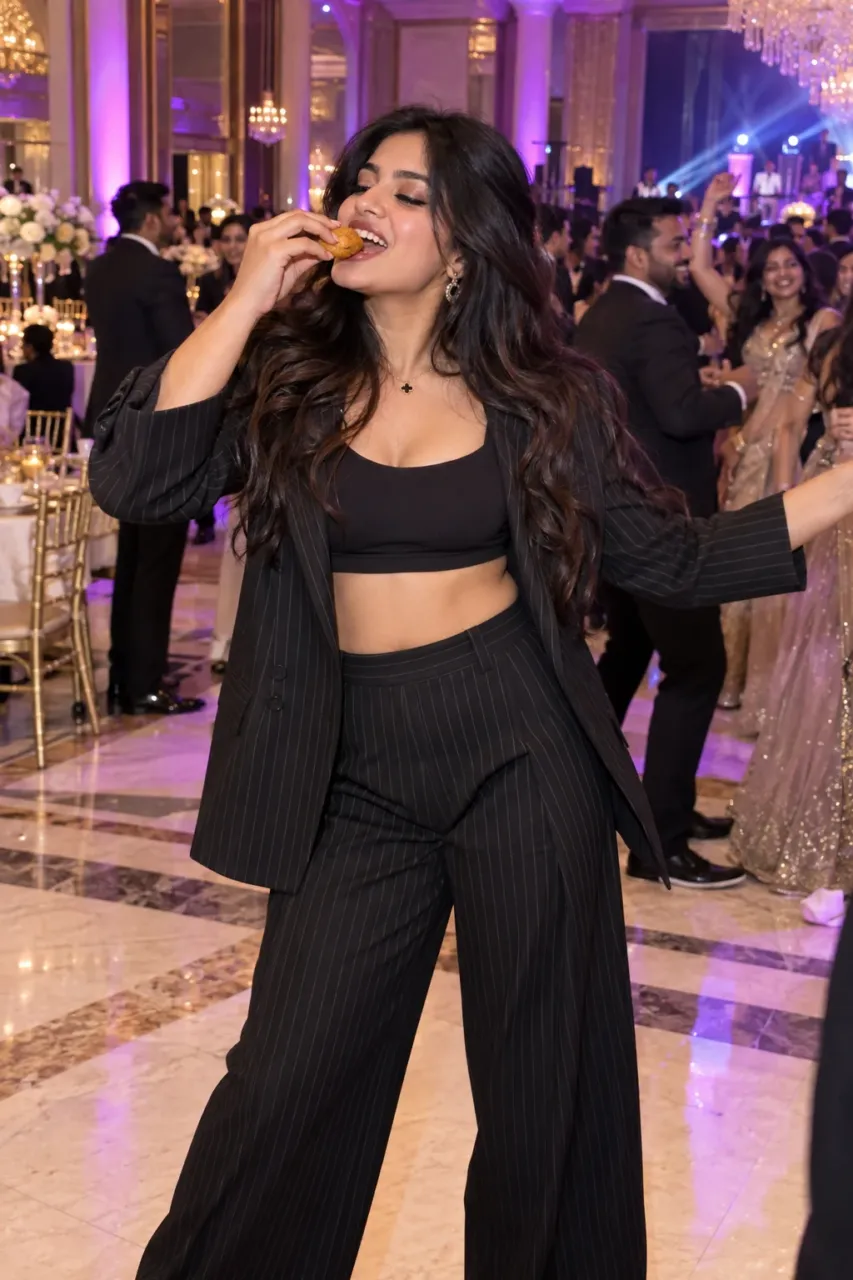
A viral Instagram reel shows a girl in a black blazer dancing toward the camera at a wedding, fully in her chilling mood, even taking a bite of a snack mid-dance. Below are 4 original copy-paste video prompts to create your own version in Kling AI, Higgsfield or Luma.
Wedding Dance AI Video Prompt by Editing Prompt
Create the viral chilling mood wedding dance video from one photo. Dance floor entry, confident walk up, the food bite moment and a close-up finale: 4 original prompts.
Listed on Editing Prompt · Link checked 22 October 2026
#weddingdance #aivideo #girlsprompt #klingai #higgsfield #fyp #viral
Quick answer
How do I make the chilling mood wedding dance AI video? The viral reel is one smooth clip of a girl in a black blazer dancing toward the camera at a wedding, fully in her chilling mood, and taking a bite of a fried snack mid-dance without stopping. Copy the 4 scene prompts below into Kling AI, Higgsfield or Luma, add your photo as the first frame, set 9:16, and stitch the scenes into the same loop.
4 original wedding dance video prompts
Each prompt below is original and free to copy. Paste one into Kling AI, Higgsfield, Luma or Runway and generate your own version of the trend.
1. Dance Floor Entry
Create a stylish vertical AI video from my photo. Keep my face and features exactly the same. I am wearing a black pinstripe blazer open over a black crop top with black wide leg trousers, my long dark wavy hair loose. I stand at the edge of a wedding dance floor in a grand banquet hall and start dancing toward the camera, hips swaying, one arm moving loose. Round tables with white floral centerpieces, gold chairs and purple party lighting behind me, guests in formal wear dancing in the background. Photorealistic, confident chilling mood, vertical 9:16, 5 seconds.
2. Confident Walk Up
Create a stylish vertical AI video from my photo. Keep my face and features exactly the same. Same black pinstripe blazer, black crop top and black wide leg trousers. I keep dancing as I walk closer to the camera on the wedding dance floor, body swaying, arms moving loosely, a relaxed confident smirk on my face, looking straight into the lens. The camera slowly pushes in from a medium shot, banquet lights and dancing guests blur behind me. Photorealistic, boss girl energy, vertical 9:16, 5 seconds.
3. The Food Bite Moment
Create a stylish vertical AI video from my photo. Keep my face and features exactly the same. Same black blazer outfit. Still dancing in front of the camera at the wedding, I raise a small golden brown fried snack to my mouth with one hand and take a happy bite without stopping my dance, playful unbothered expression, guests dancing behind me in the purple lit banquet hall. Photorealistic, fun good food chilling mood, vertical 9:16, 5 seconds.
4. Close-Up Dance Finale
Create a stylish vertical AI video from my photo. Keep my face and features exactly the same. Same black pinstripe blazer, black crop top and black wide leg trousers. I dance close to the camera in the middle of the wedding guests, small playful dance moves, a soft pout, looking into the lens while the party dances around me, warm banquet light with purple uplighting. Photorealistic, smooth loop ending, vertical 9:16, 5 seconds.
Wedding Dance AI Video Prompt by Editing Prompt
Everything you need to recreate the viral wedding dance trend: 4 original copy-paste prompts, one per scene, plus the best tools, format and settings.
Post details
| Detail | Value |
|---|---|
| Trend origin | Viral Instagram reel, 26.8K likes |
| Video subject | Girl dancing at a wedding, food bite moment |
| Setting | Wedding banquet hall, dance floor |
| Best AI tools | Kling AI, Higgsfield, Luma Dream Machine |
| Format | 9:16 vertical, 4 scenes of 5 seconds |
| Skill level | Beginner friendly |
| Category | AI Video Editing |
| Updated | October 22, 2026 |
How to create the video
Copy a prompt
Copy one of the 4 scene prompts above with the Copy prompt button.
Open your AI video app
Use Kling AI, Higgsfield or Luma and choose image-to-video.
Add your photo and paste
Upload one clear front facing photo, paste the prompt, set 9:16 vertical and 5 seconds.
Generate all 4 scenes
Keep the same blazer outfit words in every prompt so the scenes join like one clip.
Join, loop and post
Join the clips in CapCut in order, loop the end back to Scene 1, export 1080 x 1920 and post.
Note: The food bite scene is the heart of this trend. If the snack looks odd in a generation, simplify the line to (holding a small golden snack) and regenerate that scene only.
Editing Prompt: wedding dance ai video prompt questions
What is the wedding dance AI video prompt for girls?
It is a set of 4 copy-paste prompts that turn your photo into the viral wedding dance format: a blazer outfit dance floor entry, a confident walk up, the famous mid-dance food bite, and a close-up dance finale, made in Kling AI or Higgsfield.
Which outfit does the viral wedding dance girl wear?
A black pinstripe blazer worn open over a black crop top, with high waisted black wide leg trousers and loose wavy hair. Keeping the same outfit description in every prompt is what makes the scenes join like one video.
Can I make this video without dancing skills?
Yes. The AI generates the dance from your photo and the prompt. You only choose the photo, paste the prompts and join the clips in CapCut.
What food is she eating in the viral reel?
A small golden brown fried snack, like a fried pastry bite. In your version any small snack works, a samosa bite, a fry or a mithai piece, the unbothered bite is the joke.
How do I make the video loop like the original?
End your last scene dancing close to the camera, then in CapCut place Scene 1 right after it. The outfit and hall stay the same, so the join is almost invisible.