Dussehra AI Photo Prompt for Girls: 4 Festive Looks with Ravan (2026)
Your festival lookbook from one photo. Copy a prompt below, paste it in ChatGPT or Gemini, and pose with a golden bow, a lit diya, bangle stalls and a dupatta twirl under fair lights while your face stays exactly the same.
Quick answer
These 4 Dussehra prompts for girls give you a bow pose with the effigy, a diya-lit dahan view, a bangle stall mela shot, and a dupatta twirl under fair lights. Keep your face exactly unchanged in every look.
Dussehra AI Photo Prompt for Girls: 4 looks to copy and paste
Four looks, four prompts. Tap Copy prompt, open ChatGPT or Gemini, upload your photo and paste.
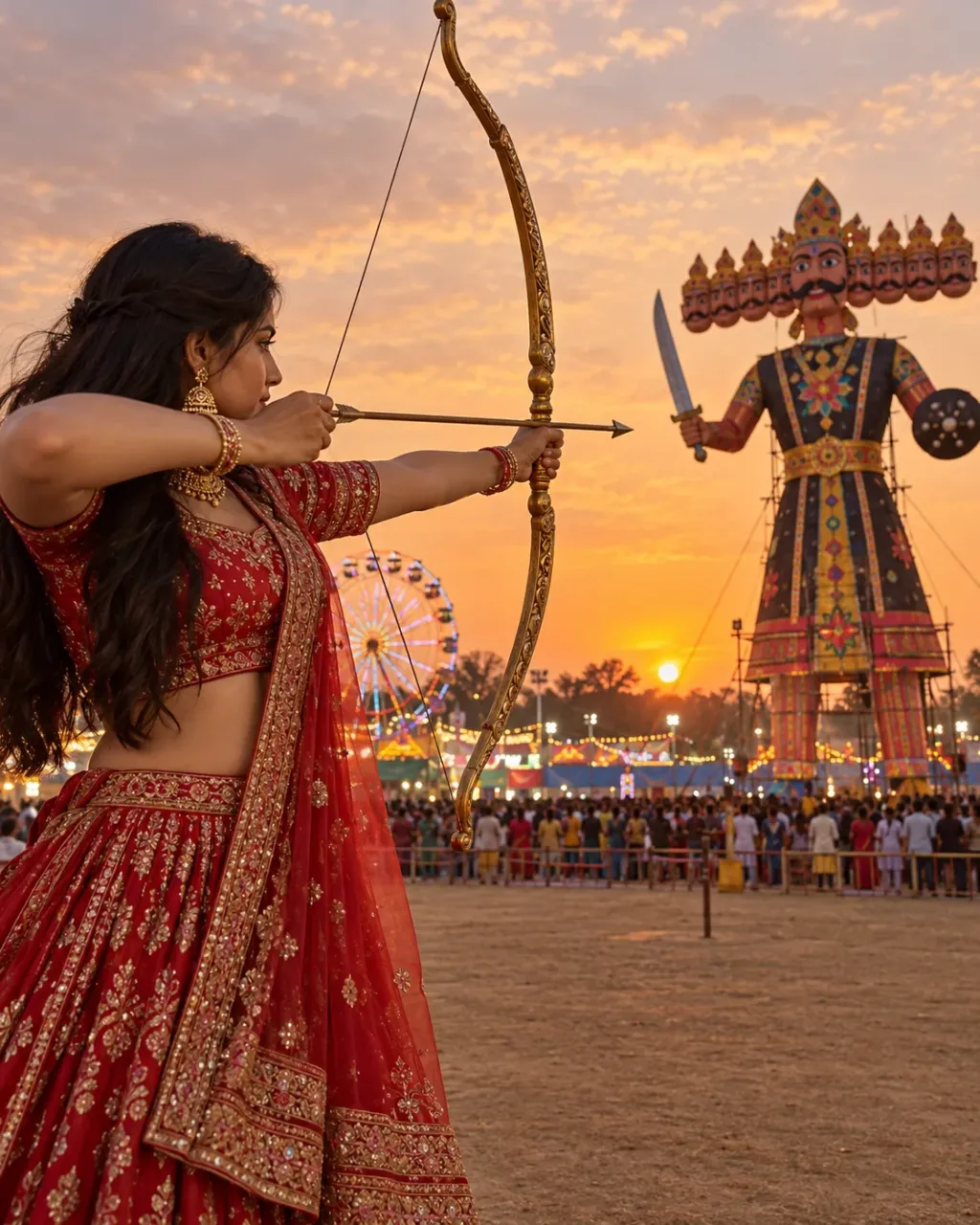
Bow Pose with Effigy prompt
Use my uploaded photo and keep my face, skin tone, and features exactly unchanged. Show me at a Dussehra fairground in a festive embroidered outfit, holding a decorative golden bow in a confident pose, a giant colorful Ravan effigy behind me, warm evening light, photorealistic, vertical 4:5.

Diya Dahan View prompt
Keep my face from my photo exactly the same. Show me holding a small lit diya, watching a Ravan effigy burn at a Dussehra celebration, orange flames and sparks against a deep blue evening sky, festive crowd softly blurred behind, photorealistic, vertical 4:5.

Bangle Stall Mela prompt
Preserve my face exactly unchanged from the uploaded photo. Show me at a colorful bangle stall in a Dussehra night fair, trying on glass bangles, string lights and festive stalls around me, candid smiling mood, photorealistic, vertical 4:5.

Dupatta Twirl Lights prompt
Use my uploaded photo with my face exactly unchanged. Show me twirling in a festive embroidered outfit with my dupatta flowing, at a Dussehra fair at night with colorful lights and a ferris wheel bokeh behind me, joyful movement, photorealistic, vertical 4:5.
Why Girls Love Dussehra Fair Edits
The Dussehra fair is a ready-made photo set: giant effigy, rows of bangles, diyas and a ferris wheel. One portrait becomes four completely different festival looks without a real photoshoot.
Each prompt locks your face first, then builds the outfit, stall or effigy scene around you. For more free picks, see the Editing Prompt homepage.
What each part of these prompts does
- The Ravan backdrop. The giant effigy turns a simple portrait into a festival poster.
- Keep the face unchanged. Locks your face so every look is still you.
- The festive outfit. Red and gold embroidery with a flowing dupatta carries the scene.
- Fair details. Bangles, diyas and ferris wheel lights give each look its own story.
- No text, no watermark. Keeps the edit clean and ready to post.
- Indian look. Keeps features and skin tone natural.
Which prompt should you pick?
- Boldest: the bow pose with the effigy.
- Prettiest: the dupatta twirl under lights.
- Most colorful: the bangle stall candid.
If a face changes, add this line
Make sure the face stays exactly the same. Paste it at the end of any prompt if the first result looks like someone else.
How to use these prompts in ChatGPT and Gemini
Open your AI tool
Use the ChatGPT or Gemini app or website, sign in and pick the image creation option.
Upload your photo
Add one sharp photo where the face is clearly visible, with decent light.
Paste the prompt
Paste the full prompt and send. If a face changes, add: make sure the face stays exactly the same.
Adjust and save
If it is close, ask for one change at a time. Then download the version you like.
Easy ways to change the look
Change one phrase at a time and compare. These swaps are starting points, and results vary by tool.
- Saree version: swap the lehenga for a Banarasi saree for a classic frame.
- Day look: change the night fair to a golden morning fairground.
- More jewelry: add jhumkas, bangles and a maang tikka.
- Friend version: add your best friend in a matching festive outfit.
- Close portrait: ask for a face close-up with effigy bokeh behind.
Fix common problems with these prompts
Most problems come from a face drifting or a scene detail looking fake. Here is what to try first.
- Your face looks different. Use one sharp, front-facing photo and add: make sure the face stays exactly the same.
- The bow looks odd. Regenerate once, props usually fix themselves on the second try.
- Dupatta looks stiff. Add: dupatta flowing naturally in a light breeze.
- Colors look dull. Add: rich festive colors, warm evening glow.
- Text or watermark appeared. Repeat: no text, no watermark, no logos.
- Background looks empty. Add: ferris wheel, stalls and string lights in the background.
AI results differ every run, so it is worth running the same prompt twice before you change it.
Questions and answers
What is a Dussehra AI photo prompt for girls?
It is a copy-paste text that restyles your photo into a Dussehra fair scene with a Ravan effigy, festive outfit and fair lights, while keeping your face exactly unchanged.
Do these prompts work in ChatGPT and Gemini?
Yes. Both tools handle the scenes well. ChatGPT usually keeps outfit embroidery sharper.
Can I use my own outfit?
Yes. Describe your real outfit in the prompt, or add ‘keep my original outfit’ before the scene words.
Why did my face change a little?
Use a clearer front-facing photo and repeat ‘keep my face exactly unchanged’ at the start of the prompt.
Are these prompts free?
Yes. Every prompt on Editing Prompt is free to copy and use.